
But, but, but you already an Si4732 mini.
Yes, but there is new firmware, notably with RTTY/CW decoding. It also supports loading the EiBiSpace schedules from a computer. And there is ETM, a waterfall display and a gray scale mode. All that and more.
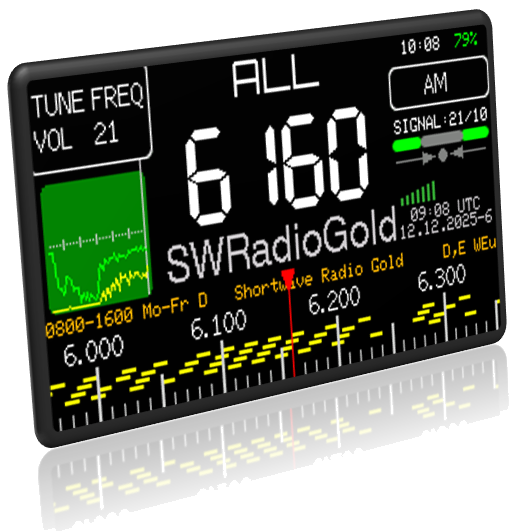
This update is from enthusiast H. J. Berndt. You can read about it and get started yourself. Ask your browser to translate to your language. Firmware is a moving target, so the best way to get up-to-date information is from the source link.
Installation
The installation instructions direct the user to employ the Adafruit WebSerial ESPTool for installation. I was lucky and picked the correct COM port on the first try. It was the one on my Windows 11 computer labeled “USB JTAG debug.” All I had to do was select the binary file I downloaded and it installed (just set the file for the first location). This is considerably simpler than the flash tool I’ve used in the past.
Station Schedules
The Si4132 Mini standard firmware has a wonderful feature, the ability to import station schedules from EibiSpace. This firmware takes a different tack. Rather than direct download from the Internet, the radio gets the eibi.txt file from your computer USB (see Flash Drive Mode below). In addition, there is a station list compiled by the author baked into the firmware. And finally the user can also load their own custom list to the radio. The main branch software does not display station names unless the time is set, but this one will display the first item matching the frequency list when the time is not set.
The time can be set via FM RDS/RBDS although I do not recommend this approach because FM stations can sometimes provide spurious time data.
Flash Drive Mode
The radio can be put into a Mini Radio Flash Drive mode, where it appears to a computer like a USB flash drive, with the ability to exchange files with an computer over a USB cable. While I haven’t used the files that can be transferred yet, I found it trivial to transfer them with Windows File Explorer. EiBi.txt is one of the first ones of interest.
Among the files that can be exchanged is “settings.txt ” where the radio’s settings can be entered rather than through the user interface. A station list can be entered in “user.txt”. Also the station scans with ETM can be accessed.
Settings
There is no longer a separate “settings” menu, but particular settings items are distributed under the main menu which has 22 items, which I’ll list following:
- Volume
- Step
- Mode
- BFO
- Bandwidth
- AGC/ATT
- Soft Mute
- Seek Up
- Seek Down
- BAND
- Mute
- Backlight
- Timer
- Battery
- AutoMute
- Classic
- Store
- Recall
- = Tune =
- Decoder
- Station
- – ETM –
One new setting is soft mute. Soft mute is a much maligned feature of DSP radio chips. It essentially lowers the volume of the radio when the signal is very weak. The firmware allows a numeric threshold setting for SNR and RSSI.
Other settings are accomplished by storing files with the USB Flash Drive interface. For example, storing a file named “greyscale” (no extension) change the color interface on the next bootup to a greyscale interface, and an additional file named “inverse” can reverse black and white.
Waterfall
The firmware supports a waterfall display. In order for this to work, the backlight brightness has to be set for 32 or 33 and then “- ETM -” selected from the menu. Thanks to a helpful user on Facebook for this info. The display is rather slow and it appears that when waterfall is painting, audio is muted. One can, however, press the encoder button to switch to regular radio mode, listen and press again to redisplay the waterfall.
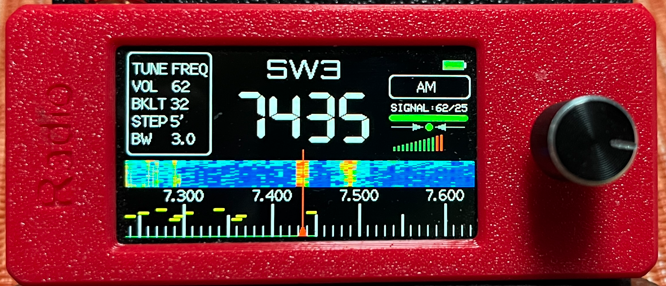
ETM
ETM scans also operate when the menu is set to “- ETM -” when the backlight brightness is set to 34 or 35. In my opinion, using backlight brightness to control unrelated functions (waterfall, ETM) is poor UI design to put it mildly. It’s also used to select stereo/mono for FM and 17 more things.
Decoding
I took a shot at the 20m ham band with Si4732 Mini V1 with the Berndt V3 firmware. An external antenna brought in many stations. I set the radio to its minimum step and bandwidth (both 1 kHz). The CW keying was very quick, most of it. Here’s a photo of it in operation:
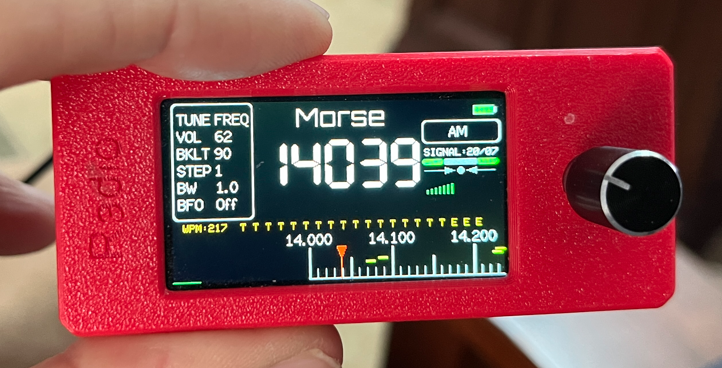
One serious problem with operation is that the bandwidth could not be set below 1 kHz, resulting in multiple CW signals overlapping. The ATS Mini firmware version 2.33 by contrast has a 0.5 kHz minimum bandwidth setting. In an admittedly short listening session, the letters T and E were all I was able to pick out from more than a dozen signals.
I recall from testing the ATS 25 max Decoder, that getting real output from CW took patience, and my success finally came from the ARRL test transmissions, which were not on at the time of my test.
One user on Facebook reported good results decoding CW from non-directional beacons, which identify via Morse code, albeit very slowly.
Internet
Nope. The notes say quite plainly:
This firmware deliberately avoids Wi-Fi and the internet
That means no NNTP server time setting, and no direct downloads of EiBiSpace.
Impressions
First, here is what the developer said about it:
This radio firmware, which I adapted for this receiver based on my personal shortwave listening (SWL) interests
I probably will not run this firmware on a full-time basis; however, it is a remarkable achievement. The ATS Mini software V2.33 by contrast has more options and a better organization. I think the main breakthrough is CW / RTTY decoding, and I hope this feature is refined and makes it into into the main branch.
Unlike the more ATS Mini firmware branches, the source code is not published.
Conclusion
I’m going to run this firmware on my Si4732 Mini V1 (that I don’t otherwise use) just for the purpose of CW / RTTY decoding and testing and run the community version from Github on my V3S.
Getting the maximum benefit from the firmware involves a steep learning curve.
Hi, just like your results All I get are a very high WPM count and lots of EEE and TTT even though the signals are loud and clean. i will try the ARRL test transmissions. Have you had any luck with RTTY Decoding?
I’ve not had any good results decoding, but I haven’t spent enough time.