
Not new, but I finally got around to installing v4.21, October 27, 2025, on my ATS25 max-Decoder.
Release Notes
AIR beta 27/10/2025
Supported Models: ATS25 / ATS25+ / ATS25X1 / ATS25X2 / ATS25 max, ATS25 max-Decoder, ATS-Decoder Pocket, ATS120, ATS25AMP, ATS25 max-Decoder II, ATS120D / ATS120 Pro, ATS-Decoder Mega, ATS25-XF, ATS25Ultra, ATS200, ARESQ aq1, ATS25 Pro+, ATS25 max-Decoder II AIR, ATS-Decoder Mega AIR, ATS200D
- The HF-FAX decoder has been added.
- Bandwidth options for 500, 1000 and 2200 Hz Morse code decoder are installed.
- Added a rewind decoding screen for the Morse code decoder.
- Added output of decoded Morse code data to the COM port.
- Added the ability to move the frequency by clicking on the Waterfall indicator in digital signal decoding and Morse code modes.
- Fixed an error with the output of a message about the need to connect an external frequency converter.
- The ability to adjust the BFO in the SSTV decoder has been removed.
- Added support for new receiver models.
- Fixed incorrect display of volume buttons in decoding modes.
- Fixed frequency error when switching VFO.
- Fixed the display of buttons in station search mode.
- Fixed incorrect deletion of the city and stations.
- Fixed the error of displaying the SSTV decoder screen after using other decoders.
- Added support for the ILI9488 IPS display with inverse color display.
Installation
I downloaded the ZIP version from http://www.harduino.ru/index.php/ru/skachat. I let Google Chrome handle the translation.
The EXE wouldn’t download onto a Windows computer, so the ZIP version was necessary. During the installation process, you will have to identify a COM port to the installer.
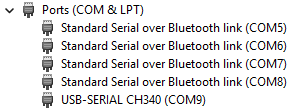
The one saying CH340 is the one to select when asked for a COM port, in my case COM-9.
When the USB cable is ready, power off the ATS25 and power it back on while pressing the encoder wheel in. If it displays WELCOME, click the encoder wheel.