
Seeking Digital Radio Mondial
I’ve been following the broadcasts from Broadcast Media GmbH, Nauen, Germany, of a station called Music 4 Joy. When the Winter 2023 schedule went into effect, I couldn’t hear them any more. A suggestion online said the broadcast had switched transmission mode to DRM. On an AM radio, DRM is said to sound like white noise.
None of my radios receive DRM and no portable radio for sale at Amazon receives DRM. Despite what the 80th Anniversary broadcast from Woofferton said about the future of shortwave radio being DRM, I think they were getting ahead of themselves.
But it’s raining outside and I don’t have anything better to do, so let’s try something.
SDR
I have an RTL-SDR Blog V3 SDR that supposedly is capable of receiving DRM with some additions. They have a tutorial.
Virtual Audio Cable
It appears that the approach is to route the audio from the SDR software (in my case SDR#) through a virtual audio cable into some other software. So the first step is installing that. The tutorial has a link to two options, a free one and a paid one. The link to the free one doesn’t work so, ka-ching, I’m out $30.
I installed the Virtual Audio Cable program and it was fairly straightforward, although lots of windows popped up. The tutorial says to set the sampling rate, but it was already correct from the start.
DRM Decoder
Next step, install a DRM Decoder called DREAM, open source. There’s a bit of a problem with the word “source.” Source files can be read by people, but not executed by computers without a transformation (called “compiling”). I don’t have any compilers on my tablet. So now I either have to install more software on the computer (and I already know how that will get messy really fast), or download a compiled version from somewhere else that is either illegal or legal depending on my country. Google Chrome warned me that the file was “dangerous” because of the file type, but I forged ahead.
Lunch
Supposedly all the installing is done, but a new challenge beyond the complexity of setting up SDR# to use the new decider — finding a station that’s broadcasting DRM. And before I can do that, it’s lunch time.
A new day – Nicht fur gerwerken
Some kind soul (Giled Letourneau) on the Internet suggested Radio Romania as my best bet for a test DRM broadcast. An hour in advance, I gave it a try.
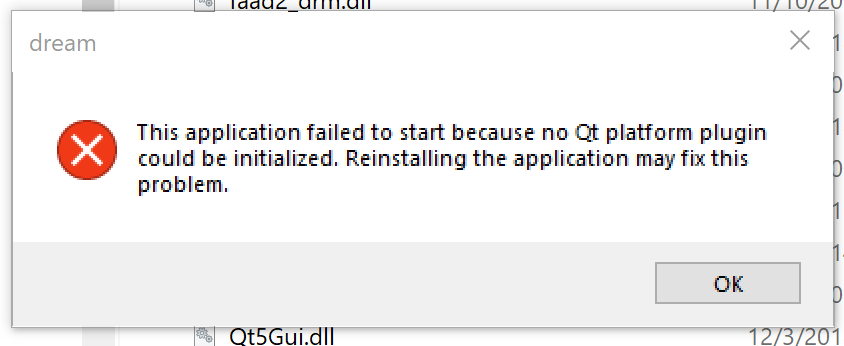
It failed. Given that the application has no installation procedure, reinstalling it doesn’t seem to be an option. So let’s see if there is a better error message in the Windows Event Viewer.
Not much in the Event Viewer except that the failing module was Qt5Core.dll, a file in the DREAM directory. OK, time to get out the big guns, Procmon. This system internals tool follows processes and perhaps I can see it trying to access something and failing. This is what it gives me to work with:
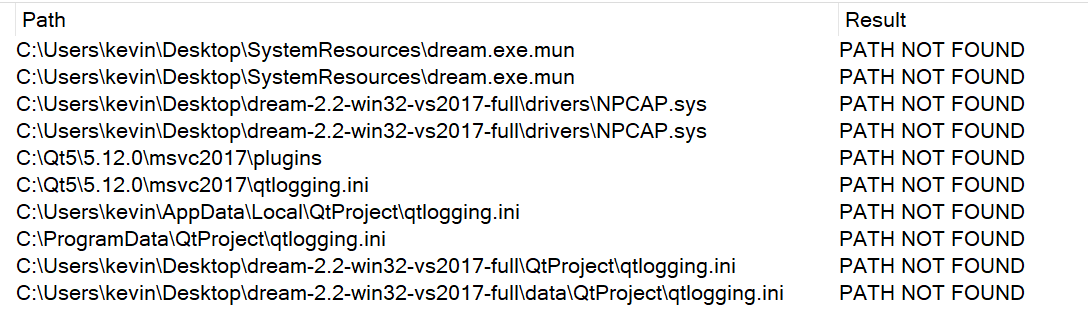
PATH NOT FOUND isn’t usually a big deal because software goes looking for things in lots of places until it finds something. It did find NPCAP eventually in a Windows/System32/Drivers folder.
I took another approach with Procmon; this time not just looking for failures. The result was 353,989 events that I will not copy and paste here. Sigh.
Rather than continuing the DREAM debugging path, I decided to search for solutions to the error message. The first led me to a Python environment — skipped that. One solution suggested was:
The platform plugin is a dll (qwindows.dll). If you know the Qt version and compiler used by the application you can download the corresponding Qt package and copy the dll over. Ultimately, however, his is a problem you should report to the provider of the commercial app
https://forum.qt.io/topic/115596/qt-platform-plugin-could-not-be-initialized
The commentary suggested that DREAM was an abandoned software project without a proper installer.
Well, do I know the Qt version and compiler? I know the Qt version from looking at the properties of some of the .dll files, 5.12.0. So, where do I get it?
Somewhat helpful thread here. That says I have to install Qt. The problem is that the oldest QT installer I found was for version 5.15, not 5.12. To make a very long story short, I found a download link for 5.12.0. The file is 2.8 GIGABYTES! Seriously? If you find yourself in a hole, stop digging. What? Dig, dig, dig. I can’t hear you. Dig, dig, dig. I have a fast internet connection, maybe not such a big drive on this tablet computer. OK, plenty of drive space. Dig, dig, dig. Download complete. Now it’s making me create a Qt account and verify it. Dig. The installer says it will take 6G. Dig. And it looks like it’s only 64 bit, and DREAM is 32 bit. Dig. It it lunch time yet?
I installed Qt. I found the qwindows.sys file in the MingW folder and copied it to the DREAM directory, tried it there and in the /plugins/platforms directory. Same error.
Restart
That was November 14, 2023 when I gave up. Now it February 11, 2025. It’s snowing outside and I have a new RTL-SDR V4 dongle. RTL-SDR.COM has a tutorial. The tutorial looks like the same thing I tried in 2023. Sigh.