
Preface
With the firmware flashed back to its original V1.4 and the radio operating again, I resume my first impressions post with a warning I recall from some manufacturer’s website that goes something like:
If it isn’t broken, don’t update the firmware!
Buzz on the internet showed that experienced MLite-880 users found the V1.4 firmware a backwards step in some respects. Not having experience with earlier versions, I can’t judge that. Nevertheless, the manufacturer, Elecevolve, certainly advertises firmware updates as an important feature. I’m not the only person who “soft bricked” their radio trying to update the firmware.
Impressions
The question I’m asking myself is whether this is a radio experiment or a shortwave listening appliance. A different way of putting it is: does this radio just receive well, or is it also useful and convenient? Stay tuned.
Telescopic Antenna
My very first impression was that the telescopic antenna was loose. The screw seemed tight already, but a little nudge of the screw with a P2 screwdriver made it much less floppy. The antenna is a decent 28″ long.
Bands
When I first turned the MLite-880 on, it was on the FM band, tuned to a frequency without a station. My first impulse was to try another band, but instead of buttons like SW, MW, FM, AIR, there was just something called BANDS. Clicking that returned a very long list of bands in a scrollable list, revealing item one to fix: the MW step that defaults to 9 kHz and show the frequencies above 1620 kHz. The other thing that’s perhaps not obvious is the “A/B-switch”
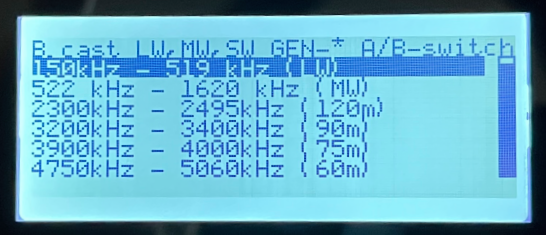
Pressing the A or B buttons reveal other band groups:
- B. cast LW, MW, SW
- Amateur bands (up to 2m)
- FM & VHF bands (Includes former Eastern Block FM OIRT, FM and Air.
It made sense once I tried the options. It’s also possible to direct-enter any frequency (Press the “FREQ SET” (4) button.
There doesn’t seem to be an actual MW band setting. The bands and steps are basically suggestions.
Settings
The setting I started with is the date and time. I don’t see any option to set the time using FM RDS, so this will be manual. It was straightforward. The time is shown on the main display screen. The Date has a surprising use (more later).
Knob and Mute
I’m not a fan of the one-knob implementation of my SDR V6, where clicking the knob does lots of different things. Here the one knob serves tuning and volume with a click to switch between them. That works ok. One feature, variable rate tuning, that I generally dislike, seems to be OK on this radio.
One small feature that always means a lot to me is a mute button, and this radio has one, at least a switch between speaker and headphone.
Weather or not?
The product literature advertises coverage to 148 MHz.

NOAA Weather Radio in the US is 162.400 to 162.500 MHz, outside the advertised range of the MLite-880, but it CAN be tuned there, and one can apply NFM decoding to receive weather:
The reader might note that 162.442 isn’t exactly a NOAA channel. It should be 162.450. I’ve heard that the MLite-880 has two calibration settings, for different frequency ranges. That’s a project for another time.
A comment on Facebook says that in the future all the MLite-880s will cover the full frequency range, even the old ones. [Update: Product description on the website has been updated.]

Display
The display is somewhat low resolution and of course devoid of color. Some owners talk about extremely bright displays that they fear will burn out. Mine looks normal. The middle setting is comfortable.
Performance
Daytime Band scans
I’ll do my usual Daytime FM band scan soon. MW is more of a problem since there is no internal MW antenna. An external antenna can be connected but that wouldn’t be fair to compare with other radios.
The MLite-880 is a top-tier performer on FM.
Reception
There are a number of features and settings that affect reception, including:
- Antenna impedance matching
- Low noise amplifier
- Noise reduction
- Bandwidth control
Noise Reduction
Its outstanding noise reduction is one of the defining features of this radio and in some cases it is nothing short of amazing. A solid existing signal provides best results.
Manual
The manual is little more than a series of radio screen shots with some of the items less abbreviated. It’s not particularly useful. Spelling was good, except for two cases where “trun” appears in place of “turn.” Generally, if someone wanted to know how to do something, they might as well just go through the menus.
Recording
The MLite-880 has a recording capability. I have half a dozen radios with a MicroSD card slot and the ability to record from radio (some from other sources too), but this radio is the ONLY one I’ve tested that correctly stores the date and time in the file metadata. Every other radio has one date-time that it uses for every file. This is a directory listing:

Notice that in addition to the date and time, the file name includes the frequency plus the decoding mode. Just WOW!
The volume level for recording is not fixed, but a user setting. Use the knob to set the gain level. When I did it the first time, the level was low.
Audio
First impression was that the radio distorts with music turned up near the highest setting. Otherwise the radio speaker sounds good — not great, but good.
Automatic Tuning
I’m often in a grab and go situation. I want to know what’s on to listen to. I don’t want to dig into the solar maps; I want the radio to tell me what’s on. That’s why my Qodosen DX-286 sits beside me. And now as I prepare to check out the shortwave bands at 11 PM local time, I’m going to grab that DX-286 to get candidates. I’ll direct enter them into the MLite-880. If it happens that the DX-286 misses something, I’ll catch it on the waterfall.
What about auto tune storage (ATS) on the MLite? There’s no table of contents in the manual. There are memories, a total of 500 of them, but I don’t see an automatic scan/store function.
Questions
- Is there a scan or auto-tune storage capability? There is an auto scan feature for the next station: on page 2 of the Radio Settings menu, set the AM tuning mode to “scanning.”
- Why is the Noise Reduction sometimes not shown on the display when actually on? When the encoder is set for volume control, the NR display is hidden
- Does Region 2 RBDS work correctly?
- Is CW fixed so that you don’t have tune off frequency to hear it? It’s fixed by Version 1.5 of the firmware.
- Is there a way to step through when the frequencies are not a multiple of the step value (like FM in the US)? Not currently.
First Impression
There’s a lot more than meets the eye. At least in some situations, reception is top tier. The noise reduction system is remarkable on some signals, and useless on others.
With more familiarity, some firmware updates and a decent manual, this has the potential of being a serious contender but there are also some things that don’t work quite right that I will be exploring in future posts. It’s a very controversial product right now.
Now there is Firmware V1.50 but no info (yet)
Looks good here.
The one thing I read that it fixes is the backlight setting that was a problem on some units.