
Fresh Out of the Box
Nice box, well padded. I was at first concerned by the empty plastic battery case included, but the battery was included, already installed in the radio. The battery was about half charged. It comes with a manual, USB charging cable, and an SMA to 3.5mm phone jack adapter.
The size is smaller than a Tecsun PL-990.
When I first turned it on, the FM band was selected. I couldn’t quickly figure out how to switch bands — need manual. I did find that the single tuning knob toggles between frequency and volume setting, and that it does not do anything to select from the menus.
Next thing for a receiver geek was to check the firmware version. The website manual says Version 2.2. The supplied manual on paper said 2.1.0. The unit itself, if I ‘m reading it right, says 1.4.
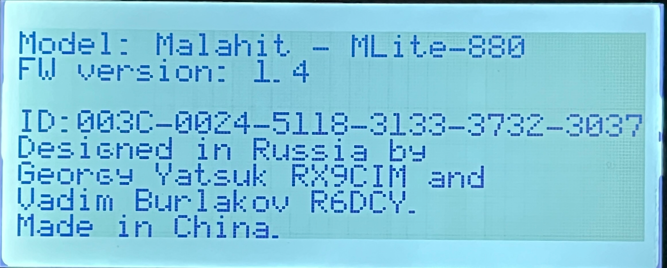
I should have known better that to think that a new radio came with really old firmware, but I didn’t and went straight to upgrading the firmware.
Firmware Update
The back page of the manual has the firmware update instructions. I went to the website, clicked “Downloads” and selected “MLite-880 One-Click Firmware Updater (Windows).exe.” The download file installs on the Windows computer, and when run requests to install a USB device. Then the MLite program itself manages the process that takes a few minutes. The instructions for the update in the manual are duplicated on the updater program screen.

The radio showed:

After running the update, the MLite-880 wouldn’t boot. First step, run the update again. The instructions really don’t say what to do once the the “Upgrade completed successfully” message appears on the computer screen. At that point the “Push 1 for reboot” disappears and after a little while the radio screen goes black.
I turned the MLite-880 off, waited and turned it back on. All it does is show a “Device ID.” I turned it off again and disconnected the USB cable. Turned it back on and just got the device ID. Pressing 1 to reboot results in the screen just showing the Device ID.
What’s confusing is that the updater BOTH says that the Upgrade completed successfully and that it failed:

Next test: Customer Service. If I had to guess, they’ll send me firmware V1.4. I believe that the firmware on the website was older than what came with the radio and this caused things to fail. At least it’s not bricked.
Update:
Elecevolve customer service has been pretty responsive, with 1-day turnaround; however, they haven’t solved the problem. They’ve suggested that I manually update the firmware with a V1.4 binary file then sent and the STM32CubeProgrammer software. The update process seems fail when it tries to write to the device, but it doesn’t provide an error message.

The final reply from Elecevolve was:
Dear Kevin, We are sorry to hear that the firmware issue remains unresolved. It seems that we will have to wait until the completion of the 1.5 firmware before flashing to that version can finally resolve the problem.
So I’ll put the radio aside until then.
In the meantime, enjoy this excellent review:
The FIX!
First, I don’t really know what I am doing, and I have huge gratitude to Bryan Liesner, a participant of the OfficialSWLChannel and creator of a Facebook group; dedicated to the product.
- There appears to be a recent hardware change in the MLite-880 and it may be the case that version 1.3 firmware will not run on the new version hardware.
- The STMCubeProgrammer software user interface works for some people and not for others.
Bryan provided me with a batch file:
@echo off
“C:\Program Files\STMicroelectronics\STM32Cube\STM32CubeProgrammer\bin\STM32_Programmer_CLI.exe” -c port=usb1 -d %1 0x08000000 -v 0x08000000 -g
Run that in a Windows command line with one argument, the name of the firmware binary file. This is my output:
C:\Users\kevin\Desktop>hit_my_malahit MLite880_new_1_4_130426.bin
      -------------------------------------------------------------------
                       STM32CubeProgrammer v2.22.0
      -------------------------------------------------------------------


USB speed   : Full Speed (12MBit/s)
Manuf. ID   : MALAHITEAM
Product ID  : Malahit-Lite DFU
SN          : 305B376E3133
DFU protocol: 1.1
Board       : --
IAP


Opening and parsing file: MLite880_new_1_4_130426.bin


Memory Programming ...
  File          : MLite880_new_1_4_130426.bin
  Size          : 2.00 MB
  Address       : 0x08000000


Erasing memory corresponding to segment 0:
Download in Progress:
██████████████████████████████████████████████████ 100%

File download complete
Time elapsed during download operation: 00:02:13.895


Verifying...


Read progress:
██████████████████████████████████████████████████ 100%

Time elapsed during verifying operation: 00:00:06.114


Download verified successfully


RUNNING Program ...
  Address:      : 0x8000000
Start operation achieved successfully
After that the radio turned itself on, tuned to FM, recalling the station I had tuned before I trashed it.
Note: as of May 9, V1.5 of the firmware is on the Elecevolve website.
I too have the same issue – but I will wait for the 1.5 firmware.
I must say I’m really disappointed in the radio, it came to me with 1.4 loaded as was very buggy, crashing and often audio and signals vanishing – that’s why I ran the “update”, which ended up soft bricking the device.
I’m left wondering what all the hype is about from the “shortwave influencers”, this radio seems very buggy and a poor purchase.
I see many negative comments about the 1.4 firmware online. I was able finally to flash the radio back to its original V1.4 and now I’m just getting to know it, and learning what things are buggy and what things I just don’t understand. I’m working on more content. There is a V1.4 binary floating around on Facebook.
I got my radio for free and I understand the temptation to hold back on negative comments out of a amplified sense of fairness to someone who did you a favor. I’m really on the fence about this radio at the start. I just need more time to understand it better.
It’s me, Bryan, the unbricker. 🙂
You haven’t made a bad purchase.
It’s an excellent radio, my daily driver, and I have a lot of radios to compare against.
Hopefully the 1.5 firmware that everyone, including me, is waiting for will be the panacea.
This radio only shipped with two good firmware revisions, 1.1 and 1.3.
I managed to get my hands on 1.4 for the sake of science, and it renders both of my units useless.
Some of us are still stuck with an LCD panel issue that runs at full brightness, that’s the other unit I am speaking of.
Unfortunately you cannot downgrade, this may be due to a bootloader change.
I wish you could. 1.3 would give you an excellent experience.
On my original unit, I eagerly put 1.2 on it and found that calibration did not work, I downgraded back to 1.1 and waited for 1.3, which is excellent.
This was the birth of the Linux script and Windows batch file.
I want everyone in the community to have a safe, repeatable process to follow and avoid mysterious device drivers and excecutables.
This means installing the STM32 Programmer and using my batch file.
There is nothing magic about it, at the same time what is magic about it is you understand what is happening on your PC.
Transparency is king:
I have an inherent mistrust of arbitrary executables from China for starters, and I don’t own a single Windows PC.
i have exactly the same issue did you ever get it sorted?
No, It’s not sorted. I received this from the manufacturer this morning.
“Dear Kevin, We are sorry to hear that the firmware issue remains unresolved. It seems that we will have to wait until the completion of the 1.5 firmware before flashing to that version can finally resolve the problem.”
ok thx. i tried manual update like you did to no avail. I will wait until they provide updated firmware.
I now have the radio working. I’ll update my post above to explain what I can.