
The package consists of a MW/FM/SW/WB radio with stereo speakers, plus a repeater — an external device that is a radio itself, able to relay received audio to the base radio. The repeater adds AIR band and VHF/UHF.
Let’s start with a video. It’s a transmission of Radio Romania at 01:33 UTC on 30-June-2026 on 9495 kHz.
In the upper right of the radio display is an antenna symbol with the letters *EXT* underneath; when solid on rather than blinking, the icon informs us that the radio is receiving an external signal from the W3 repeater. The repeater was on the back porch about 5 meters away, and connected to the repeater was the 3 meter wire antenna supplied in the W3 accessories pack. In my opinion, this is the “normal” use case for this product.
The “9.495 MHZ” tells the frequency, almost. The bandwidth is fairly wide, so the station is easily heard on 9.490 and 9.500 (noting that this is a strong signal). The little number “5” is blank on frequencies that are multiples of 10 kHz indicating that 5 kHz is the smallest tuning step on SW. The display shows signal to noise ratio (SNR) is 16 and the relative signal strength (RSSI) is 72.1
The video shows what an iPhone microphone picks up.
It’s an interesting concept, separating the antenna from the radio. I can carry around my shortwave radio and not worry about the antenna cable. I can ignore some noise issues. So the evaluation boils down to how good the radio with this unique feature is.
For a shortwave radio enthusiast, you’ve seen what it can do for you. But it does other sorts of things, and the following table covers some of that:
| Feature | ZWS-802 + W3 |
|---|---|
| MW Band (kHz) AM | AM decoding of the MW band 522 – 1710 520 – 1710 |
| MW step | 9 or 10 kHz |
| FM band (MHz) | 87.5 – 108 64 – 108 76 – 108 87 – 108 |
| FM bandwidth | 50, 100, 150, 200 kHz |
| WFM Stereo | Y |
| SW Band (MHz) AM | 3.2 – 21.85 |
| SW step | 5 kHz |
| SW display resolution | 5 kHz |
| AIR Band (MHz) AM | 118 – 138 Requires W3 |
| Weather (MHz) NFM | 162.4 – 162.55 |
| V.UHF (MHz) NFM | 25 – 999 Requires W3 |
| Antenna | 21″ (53cm) |
| Antenna Jack | 3.5mm |
| ATS Memories | 200 per band |
| Records from Radio | Y |
| File formats | MP3, WMA, WAV, APE FLAC |
| Record format | MP3 |
| Max TF Card Size | 256GB |
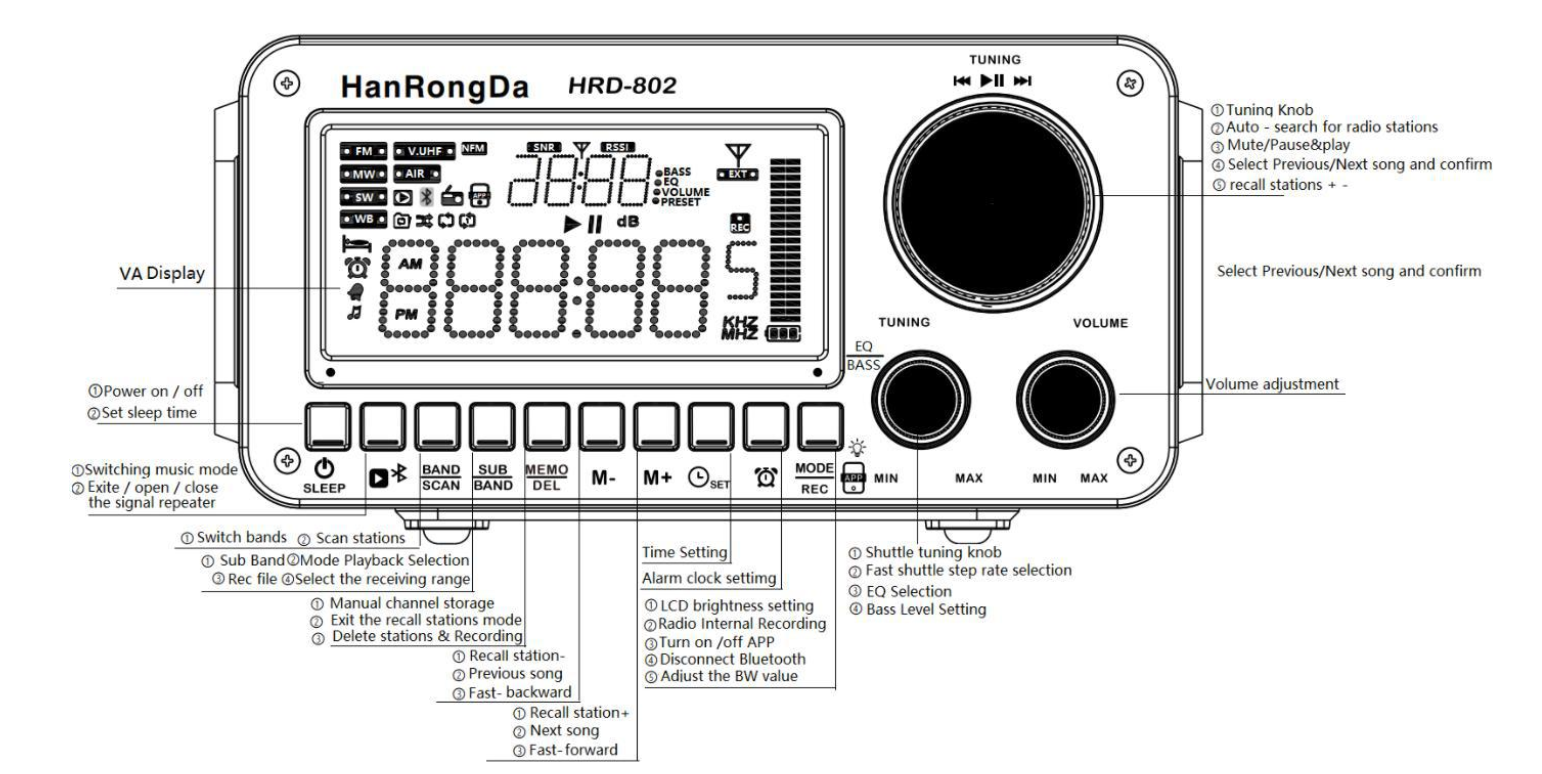
Here for quick reference is a schematic of all buttons and indicators from the manual:
In the Box
The notable accessory for the ZWS-802 is a black zipper case. I’m unlikely to use it because the radio is big and heavy, not designed for casual portable use. It includes a USB-A to USB-C charging cable and a 3.5mm audio patch cable. 3 x 18650 batteries are included along with a P1 screwdriver necessary for opening the battery compartment.
The W3 repeater has its own USB-A to USB-C charging cable, a 3m wire antenna terminated in a 3.5mm plug and a hanging clip on the other end, a UHF antenna for the repeater signal, 2 x flat top 18650 batteries (no screwdriver required), and it includes a piece of adhesive plastic designed for attaching to a window to support the antenna. There are two manuals, one for the 802 and one for the W3. The retail package is nicely made with foam inserts to keep everything safe and organized.
Look and Feel
The angle at which the display screen is viewed is critical; it must be viewed from above, not straight on and certainly not below level. Outdoors it’s useless at the default setting and even with the brightest setting you’ll be looking for shade. One would be better served using the app to control the radio outdoors. There is a brightness setting with values of off, moderate bright. Use the button with the light bulb next to it (see display layout preceding). I set mine on the brightest setting all the time.
Everything is bright and shiny. The buttons are easy to use, and can be operated by feel. The metal knobs work well. It’s a good-looking package with a wooden case. There are convenient feet on the front to angle the radio up for easier view. The notable thing is how heavy it is. The radio alone with batteries weighs 2 lbs., 9.9 oz. or 1186 gm. It makes a difference in how one holds it.
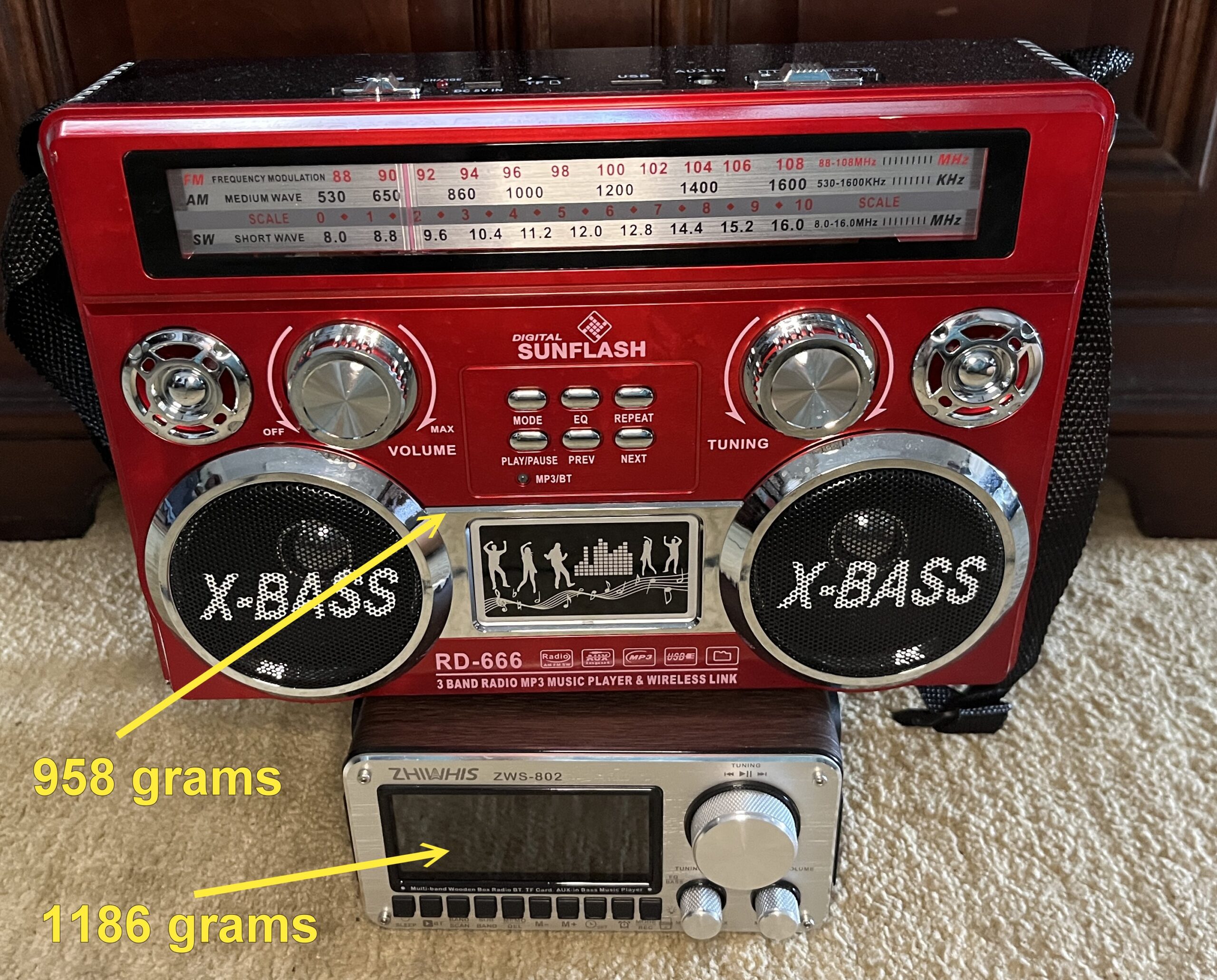
Size is a big factor in perceived weight. While the huge Sunflash RD-666 is not all that much lighter, it feels very much lighter to me. The perceived weight difference was so large that I double checked the weight measurement.
Sound and Playback
Yes, it is stereo! I used my Left/Right test file through an FM transmitter and received it on the ZWS-802. The left channel clearly appeared only in the left speaker and the right channel only in the right.
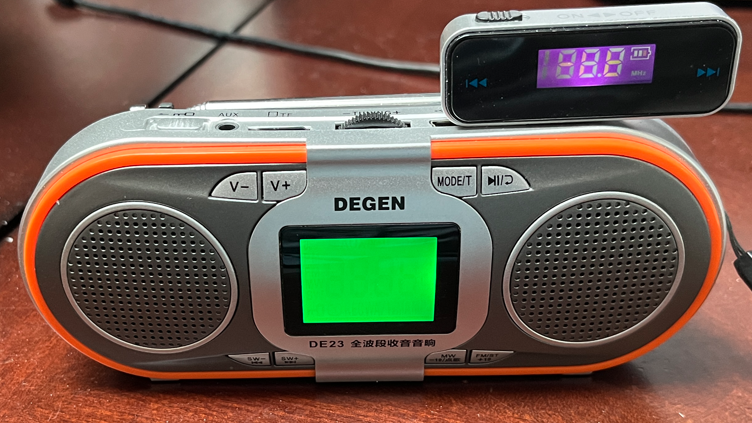
The ZWS-802 plays about everything: Radio, Bluetooth, AUX cable, computer USB speaker, and TF card (MP3, WMA, WAV, APE and FLAC).
PC
I connected a USB-C cable between the 802 and my Windows computer. The radio display switched to “PC”. The TF card contents was available through Windows File Explorer and a new audio output device appeared that allowed me to play PC music through the 802.
Recording
To initiate recording, double click the button labeled [ MODE | REC ]. Press again to stop. Now some magic happens! This is the display of the DSP_REC folder:

Right there in the file names are the band, the frequency, the current date and time. One might wonder where it got the date, given that there is no user date setting. I suspect it was stored when I set the time automatically through the Radio-CT app. The date is “20260704” (2026-07-04) and the time “1654” (16:54 UTC) and I have no idea what the stray “1” is at the end. This feature is a big deal. The only other radio I know of that records the reception details is the MLite-880.
The recording format is MP3, which saves space over lossless WAV recording. The TF card is easy to insert and remove, not the case with many other models.
Sound Quality
I put a ripped CD recording (appropriately ,”Too Darn Hot” sung by Stacey Kent from her 2003 album “The Boy Next Door”) on a MicroSD card and played it on both the 802 and a Tecsun PL-990. Both sounded great. I got an expert (a teenager) to listen and he said the bass was better on the 802, and liked it more. I thought there was a little more presence on the PL-990, but I wear hearing aids so what do I know. Of course only the 802 is stereo. I compared it to my Logitech Z407 computer speakers and and it still sounded good. Note: I had the 802 set to the E3 equalization profile — it matters.
Operational Tips
Watch for the flying shuttle!
The shuttle has two essential uses, first to set the FM step conveniently, and second to accelerate tuning on the other bands where there is no direct frequency entry on radio.
Manuals for HanRongDa radios often mention some knob they call a “shuttle” (Flying the Shuttle: Raddy RF760 Tips and Tricks). Confusion is increased because there are TWO knobs labeled “TUNING” and turning either of them changes the receiving frequency of the radio. The manual calls the large TUNING knob “Tuning” and the small TUNING knob “Shuttle Tuning” or “spindle.” Both knobs are also buttons.
Turning the small Tuning Shuttle knob changes the frequency received by the currently set step amount supported by the band. After turning the knob, one of the displayed frequency digits will remain flashing for 5 seconds. While any digit is flashing, pressing the Tuning Shuttle knob will cycle through which digit is flashing. Then turning the Tuning Shuttle knob will increment the digit that was flashing so with this scheme, it’s possible, for example, to tune FM with a 100 kHz step rather than the default 50 kHz step. It appears that the incremented digit is set separately for each band, and the value is retained when the radio is turned off.
A brisk rotation of the main Tuning knob initiates a scan until a station is found and the scan stops. The radio seems finicky about starting the scan but just keep trying.
The [ SUB | BAND ] button skips through frequencies across the selected band, providing another way to move more rapidly across the frequencies than could be accomplished by just turning the tuning knob for a very long time.
The weather band has an alert function missing from the manual described later.
Reception
The dangerous heat dome over much of the US has delayed outdoor testing of the base radio using the midday band scan protocol. It’s 99F degrees with a heat index of 115 as I write this.
MW
Both the ZWS-802 radio and the W3 repeater have internal MW antennas. When I tried MW using the W3 repeater at midday, the results were mediocre, only 10 stations could be heard and most of them extremely weak. But with that said, looking at the Daytime Band Scan history, some fairly well-reputed shortwave receivers don’t do better on MW. Good MW reception in my area in the daytime requires an external antenna and a radio that supports one.
When I tried the base radio alone, the number of stations dropped to 2; reception like that is nothing but a joke.
FM
I recommend taking the time to set the Shuttle Tuning knob FM step to 100 kHz rather than the default of 50 kHz (200 is not an option), following the instructions above. There is also a bandwidth setting for FM, from 50 to 200 kHz. Mine defaulted to 200, which is correct for my region.
I’m not certain, but it appears that for FM, the step works for the main tuning knob, but for other bands it works for the Tuning Shuttle knob. Sounds like a bug.
I tried FM with the base radio and the results were good. It’s not quite comparable with a Qodosen DX-286 or a Tecsun PL-990, but respectable at 72 stations.
The repeater was another story completely. The repeater lacks a telescopic antenna but is supplied with a 3m wire, or some other antenna could be plugged in the 3.5mm jack. I just draped the wire antenna that came with it on the outdoor patio umbrella. The results were abysmal. I got only 33 stations and several of the stations were some sort of artifact, reflecting no actual station. There was serious distortion. I would rate this as totally unacceptable garbage on FM.
SW
The shortwave band only covers 3.2 – 21.85 kHz, omitting the higher shortwave frequencies as well including Citizens Band and the 10m Amateur radio band. Those two are technically covered by the V.UHF band, but that band is only for NFM demodulation.
My test procedure for SW was to take my Qodosen DX-286 out to the patio about 9:30am and hook the long wire antenna supplied with the W3 to it. I did an ATS scan and listened to all the found stations (some just noise or RTTY). Then I hooked the same 3m antenna to the ZWS-802 and direct tuned all the stations. Then I turned on the W3 repeater and went through the stations again.
Frankly, there wasn’t a great deal of difference in the three trials. One thing I did notice, however, is that I had to separate the W3 from the 802 to prevent significant interference. In normal use they would never be close. Here are videos I took, first of the DX-286 and then of the ZWS-802 + W3. The station is probably Radio Romania in Arabic. Frequency 15320 kHz
Given the relatively poor performance on MW and FM, I expected the W3 repeater to be next to useless on shortwave too, but I was totally mistaken. While many shortwave features (including the ability set bandwidth and usable ATS) are lacking, still it is a credible receiver on shortwave, both with and without the W3.
[Update: It s a few days later, July 24, and my W3 repeater is out on the back porch with its 3m antenna stretched out east-west. The repeater has been on a couple of days and this morning I tuned the radio to 6050 kHz and was pleased to her station HCJB at 6:40am with some Andean music. This is supposedly a 1 kW station, and so I was pleased to get it. This might be a typical use case — just turn the radio on anywhere and let it connect to the repeater.]
AIR
Air band uses AM demodulation on frequencies between 118 and 138 MHz. It requires the W3 with the 802. repeater. I tried the most active AIR band frequency in my area (126.875 MHz) and got excellent reception with superb audio quality. The only problem was that at the end of each transmission, the AGC was very slow to recover, resulting in a very loud hiss that gradually tapered off (around 4 seconds). There is no squelch. Here’s a sample exhibiting the slow AGC recovery:
V.UHF
V.UHF covers 25 to 999 MHz. It requires the W3 repeater and provides narrow FM (NFM) demodulation, duplicating the weather band frequencies. Since the weather band is contained within the V.UHF band, I tested the band by tuning to a weather frequency and received my local NOAA station. The station had a notably thinner sound than the same station heard on the weather band setting — lower volume and less bass. Bandwidth on weather band is about 11 kHz NFM. There are bandwidth settings on the W3, according to the manual:

I presume they intended kHz rather than MHz. In any case there was no change in audio when I changed the V.UHF bandwidth setting.
Weather
Enabling weather band reception requires setting the radio to the “Americas” region (technically, setting the lower FM band frequency to 87 MHz). Weather is broadcast on 7 frequencies between 162.4 – 162.55 with narrow FM (NFM) demodulation. It appears that only the United States and its territories still broadcast weather information on this band. Both the 802 and the W3 can receive weather band.
I tried the ZWS-802 + W3 on weather. The W3 was just on the back porch on shelf. I got strong reception of three weather stations, which is very good from that location. I received KHB36 on 162.550 in Pikesville, Maryland (132.65 miles), my local station KZZ28 at Covesville, VA (21.6 miles miles) on 162.450, and WXK65 on 162.475 in Sandston, VA (58.1 miles). Weather station reception is normally limited to line-of-sight distances, but can vary due to atmospheric conditions (tropospheric ducting), so fringe reception on the weather band is possible. Ducting can be driven by temperature inversions, sharp humidity drop with altitude and high-pressure systems.
Due to an omission in the manual, the user is not informed that the radio has an alert feature that scans the weather channels looking for a specific emergency tone. When the tone is detected, the radio issues an alarm tone and turns on. To activate the alert feature, select the weather band and long press the [ Band | Scan ] button; the radio will show “ALE” on the display. Long press the same button to turn it off. Because it is a scan, you may receive an alert for a station outside your area.
The bad news
We had bad weather today and the weather alert just remained silent. My ZWS-2415 screamed when the alert was issued, but the ZWS-802 did nothig.
The Elephant in the Room: the Manual
This may be the worst radio manual I have ever encountered. It is incomplete, poorly formatted, confusing, sloppy and in places just plain wrong. This is a section that just happened to be open:
9.1.1 Before listening to the FM/SW/V.UHF/AIR radio programs, please pull out the telescopic antenna.This radio is equipped with a seven-section 360-degree rotatable telescopic antenna.Pull out the antenna and adjust its length and direction.You can then find the optimal position for the best reception effect.
I wouldn’t make a big deal about the missing spaces following the periods, but the major problem is technical. V.UHF and AIR bands on this radio are only supported through the W3 repeater — the base unit cannot receive them alone, so the positioning of its antenna is irrelevant for those bands, and lest anyone suggest that it applies rather to the antenna on the repeater, I just note that there is no telescopic antenna on the repeater.
Many radios that can receive weather band also have a scan mode that sounds alarm if NOAA issues an emergency alert. I wondered if the ZWS-802 had the feature. Section 9.10 of the manual is the entire topic of weather band.
9.10:North American country WB weather band(NOAA band)
When the receiving frequency band is set to 87-108 MHz, the radio will be enabled to use the WB weather band.Short press the [ BAND | SCAN ] switch WB band.
WB (North American Weather Band) receives seven frequency points:162.40MHz,162.425MHz,162.45MHz,162.475MHz,162.50MHz,162.525MHz,162.55MHz
short press the [ SUB | BAND ] button or rotate the [ TUNING ] button to select the WB receiving frequency point.
Activate the warning system:
And there the weather band section of the manual ends, leaving the question of activating the “warning system” hanging. It turns out that there is a weather alert feature. I found that by consulting a manual for a different radio made by the same company. When on the weather band, long press (about 2 seconds) the [ BAND | SCAN ] button until the display shows “ALE” in place of the frequency. Another long press ends the scan.
Then there are mistakes an elementary school student would recognize:
- The LCD display the sleep time of “120” minutes.
- The alarm will continue to ring the next day.
- Select APP off:Indicates that cannot using the APP
- 24.Matters need attention
- It is recommended to charge a charging device…
- … do not barbecue or blow bake at high temperature
- “Sencods”
- Wrong units on bandwidth
The manual gets a grade of “F”.
The W3 Repeater
The repeater should be the star of the show, a reason someone might want to buy this package. Its stated purpose is to allow listening to radio in a noisy indoor environment. The repeater can be mounted on a window or even outdoors with some weather shielding. It comes with it own 8-page manual. The documentation suggests it be installed indoors near or on a window with a supplied “punch-free hook” (an adhesive plastic strip).
In repeater mode one could view the main radio as a combination remote control and Bluetooth speaker, and the repeater as the actual radio. The problem is that the W3 is a mediocre MW radio and a total disaster on FM (refer to the reception section preceding). It works fine on SW, however. The repeater introduces a delay in reception perhaps a quarter of a second.
The W3 has a UHF antenna used to communicate with the base radio (the supplied antenna has an SMA connector and is just screwed on). There is also a supplied 9-foot wire antenna terminated with a 3.5mm stereo phone plug. There is a power button, charge light and a power-on light — and then things get interesting — there is a mode button and a mode light.
One can turn on the repeater and then the radio; they will connect. Then if one turns off the radio, the repeater goes off and stays off. Standby is a different power mode. Here’s what the manual says:
Short press the [MODE] button,turn on the signal repeater,after turn on the signal repeater,long press the [MODE] button, enter to Mode status,it is Automatic Wake-Up Mode.
When this mode is in operation, the power consumption is relatively low and the standby time is also longer.
After activate the wake-up mode,when awakened, the MODE light will be on.
If the 802 radio is connected, the signal repeater will enter a low-power mode.
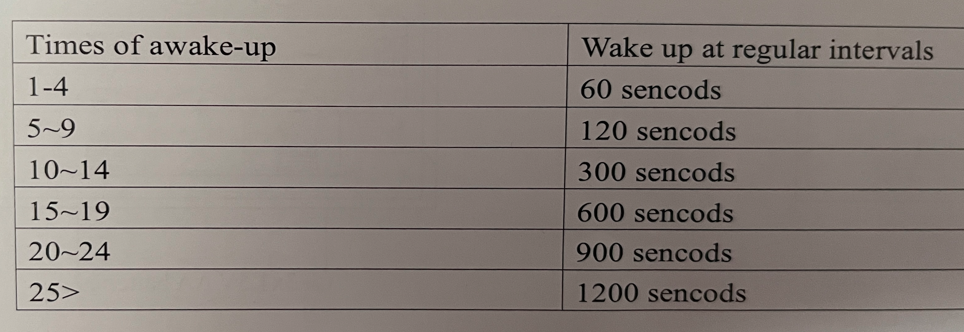
Each awakening time is 60 seconds.If the 802 radio is not turned on,it will increase as the number of awakenings increases.
The relationship between the awakening frequency and duration is as follows:
I don’t understand the instructions. What I did note was that I long-pressed the power button in hopes of turning the W3 off, all the lights went off, but after a few minutes the lights came back on.
Update: I intentionally left the repeater on wake-up mode, waited a couple of days and turned on the 802. Around 5-10 minutes later, they connected.
Update 2: Two days later the Repeater is still working. Wake up time seemed 10 minutes.
Update 3: Nine days after writing the article the repeater wouldn’t connect. I went out and touched the power button and it came on and connected. I tested the batteries and they were 73%.
The interesting question is the range. The manual says up to 35 meters (114 ft), but only 10m if there is a wall. I found the range to be more than 10m.
The App
This is the same Radio-C (Harmony and Android) / Radio-CD (Apple) app used with a number of radios from HanRongDa including the Zhiwhis ZWS-C919, HanRongDa HRD-908, HanRongDa HRD-757 and Raddy RF75A. The app adds functionality:
- Direct keying of frequency (except weather band)
- Display of file name when playing from media
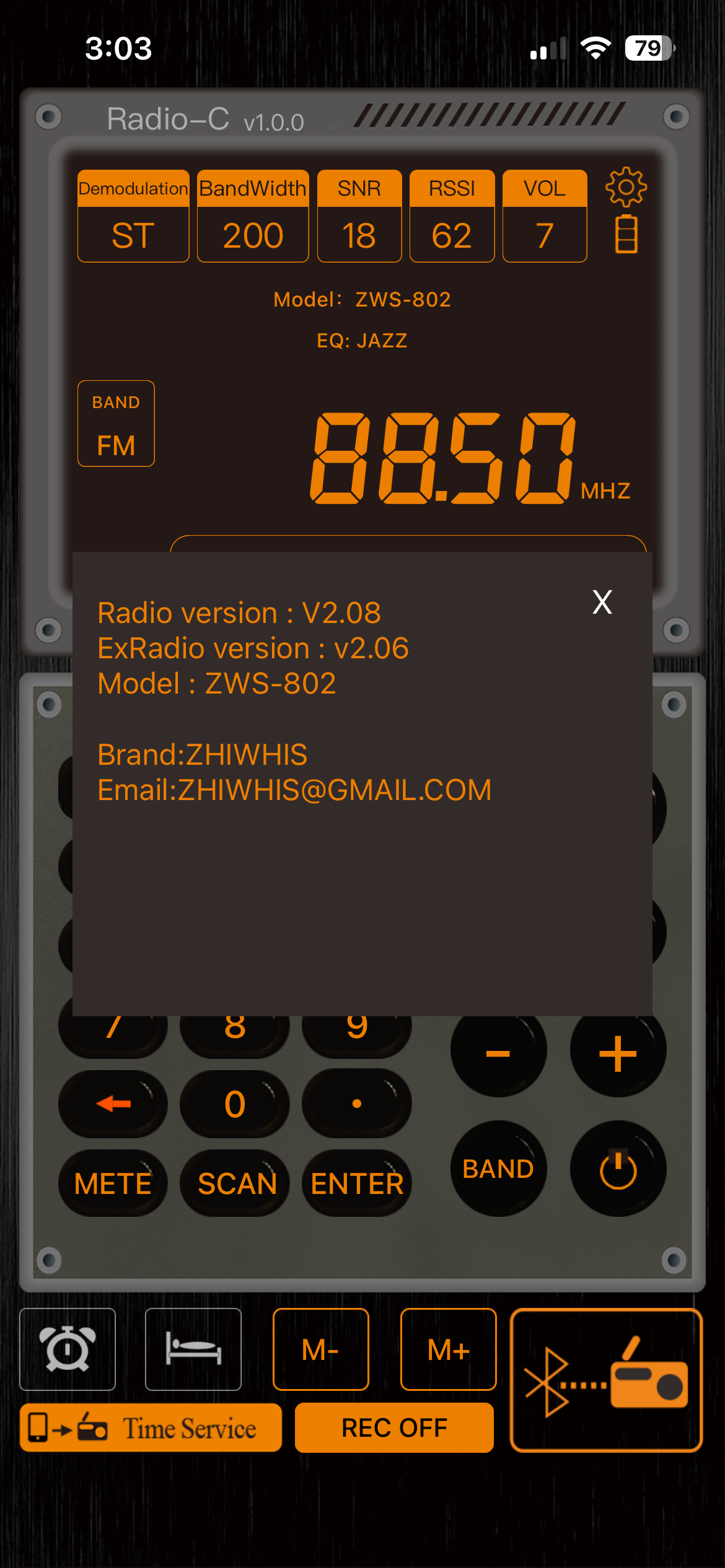
- Display of firmware version for both radio and repeater (2.08 and 2.06 in my case, see illustration)
- Status display
- Automatic setting of the radio clock (and apparently the date)
Conclusions
So it’s an interesting experiment.
On the plus side, the stereo speakers are really good and real stereo is uncommon. While it lacks direct frequency entry, that’s largely remediated with direct entry on the app. All the bands work acceptably or quite good on the 802 base unit, and all work equally on the W3 repeater except for the MW and FM bands. Shortwave is reasonably sensitive, but bandwidth lets channels overlap. Shortwave coverage is limited to 3.2 – 21.85MHz.
I’ve had the W3 repeater on for 5 days in standby mode and it still wakes up when I turn the 802 on after 5-10 minutes. So the ability to move a radio around the house, and still use an outdoor antenna, is attractive. It would be more attractive if it had SSB, bandwidth settings and a wider tuning range.
I don’t know what the deal is on FM. Possibly the W3 is overloading, since I used the supplied 3m wire antenna. FM sounds great on the base radio, so if you don’t need the repeater for FM, then fine. One might also try a shorter antenna for FM.
The lack of SWL enthusiast features speaks against this model. It works as a weather radio, a kitchen radio, a Bluetooth speaker and it does have a wide V.UHF range up to 999 MHz.
Personally?
I have a LiJiANi RD-239S + W2 repeater on order. My best guess is that when it comes, all the repeater scenarios will be covered by it. The lack of direct frequency keying on the ZWS-802 is a big deal. So if the 802 gets used at all, it will be for FM music without the repeater, or as a Bluetooth speaker.
Last week a houseguest asked me if I had a Bluetooth speaker he could borrow and I handed him my Sunflash RD-666 because it has big dual speakers (not stereo). Next time I might pick the ZWS-802. My best guess is that this radio will end up unused in a cabinet.
Footnotes
- SNR on a radio tells you how far the signal rises above the noise floor. A higher value means clearer reception; a lower value means the signal is being buried in noise.
Meaning: SNR is the ratio of signal power to noise power, usually shown in decibels (dB). A value above 0 dB means more signal than noise.
Use: Radios display SNR so you can judge how intelligible a station will be. Even a weak signal with high SNR is easier to copy than a strong signal sitting close to the noise floor.
Practical takeaway: Higher SNR = cleaner audio and more reliable decoding; lower SNR = noisy, difficult reception.
RSSI tells you how strong the total received RF energy is at the antenna, regardless of whether it’s useful signal or noise. It’s a raw strength measurement, not a quality measurement.
Meaning: RSSI (Received Signal Strength Indicator) is usually shown in dBm or as a relative scale. It measures everything in the passband — desired signal + noise + interference.
Use: It helps you judge whether a signal is strong enough for the radio to lock, demodulate, or decode. High RSSI doesn’t guarantee good reception; you can have a loud but noisy signal. That’s why RSSI is often paired with SNR.
Practical takeaway: RSSI = how loud the RF is. SNR = how clean it is.
[Footnote from Copilot AI]
↩︎
The W3 uses the AKC6958 chip,
while the W2 uses the SI4735 chip.
Theoretically, the W2 has better performance.
Great review.
I’ve been testing mine and was please to hear the local music AM radio station loud and clear without too much fuss. This was just the radio and not the repeater. I now have the repeater hooked up and am trying to test it with my outdoor antenna, but am not having much luck. Also trying various shortwave stations. This makes me wonder if the repeater rem0tes an antenna for all bands or a subset. Note the remote unit shares an antenna feeding a amp then splitter from my outdoor antenna. This splitter feeds numerous SDRs with no problem in reception. Signal generator is next I think.
I believe the repeater works on MW, SW, FM and weather bands, but its MW performance is very poor.
What a fantastic review! This is so thorough and helpful. I just bought this radio, and were it not for this article I would have never known about some of these tips and tricks unique to this device. Thank you so much for taking the time to do such a deep dive into the radio, and then taking the time to share this information with the public. I’m just a casual radio listener and a lot of this information is above my skill set, but I am becoming more and more interested in the hobby. You’re a great ambassador of this field of knowledge. Thanks, again!
It makes me happy to know I helped someone.