
Don’t
That’s my advice. There is a newer version with the Megatron M17 mods and I was led to get it from the Deepelec website. After installation, the new version showed a Deepelec logo when I boot the device, but more importantly M17 broke the mute button (the zero key). The mute becomes erratic and you have to push the button many times. This is awful for comparing two radios. I reinstalled M16.
I’ll revisit the decision when the mute button is fixed.
But If You Do
Here’s a detailed outline of how to do it.
For the Sparkelec device, use the SDRRADIO project on GitHub. Then select the “Touch Firmware” folder to get the Megatron modified version.
- Download the .rar file for the desired version and unarchive it into some folder on your PC. Windows File Explorer can do this.
- Turn off the radio, but leave the power switch on.
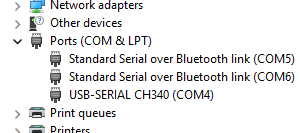
- Open the Windows Device Manager and expand the COM item.
- Connect a USB cable from the USB-C port on your DP-666 to a USB port on your computer. Make sure the cable supports a data connections. The one that came with the device should work.
- When a new entry appears in the Device Manager that looks like USB-SERIAL CH340 (COMx) where x is a COM port number, note the number. (See Figure 1)
- Hold down the ESP32 BOOT button on the right side of the DP-666 and while holding it press the power button briefly, as if starting the radio; however the display will remain black.
- Release the BOOT button.
- Go to the folder where you extracted the files and double click flash.bat. Reply that it’s OK if Windows asks.
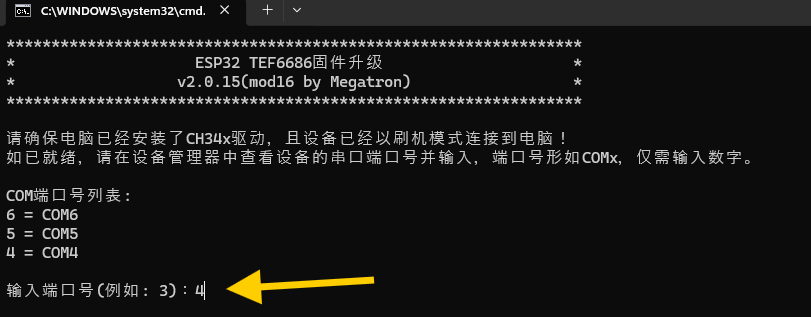
- When promoted for the COM port number, give the one noted from Step 5 and press Enter. (Most of the rest of the window is in Chinese.) (See Figure 2)
- The window will then show 正在升级,请勿断开连接 (Upgrading, please do not disconnect).
- If it fails, the window will show 升级失败!请检查设备与串口状态….. 按任意键退出 (Upgrade failed! Please check the device and serial port status. Press any key to exit.)
- If it succeeds, it will take a while and finally say 升级完成!按任意键退出~ (Upgrade complete! Press any key to exit).
- Press a key on your computer keyboard to exit and then press the power button on the DP-666 to boot.
- It should boot to a language selection screen.
- Rotate the tuning knob to select the desired language and press the tuning knob down to set it.
- Rotate the tuning knob to select basic or advanced mode (I chose advanced) and press the knob to select.
- The device will then boot normally.
I found that the radio retained its prior Wi-Fi configuration, but that I had to go into the Menu system Connections panel to turn in on. All my other settings reverted back to default: RDS Region, MW step, FM step, FM de-emphasis.
I updated it and it works flawlessly, there are no bugs with the mute button.