
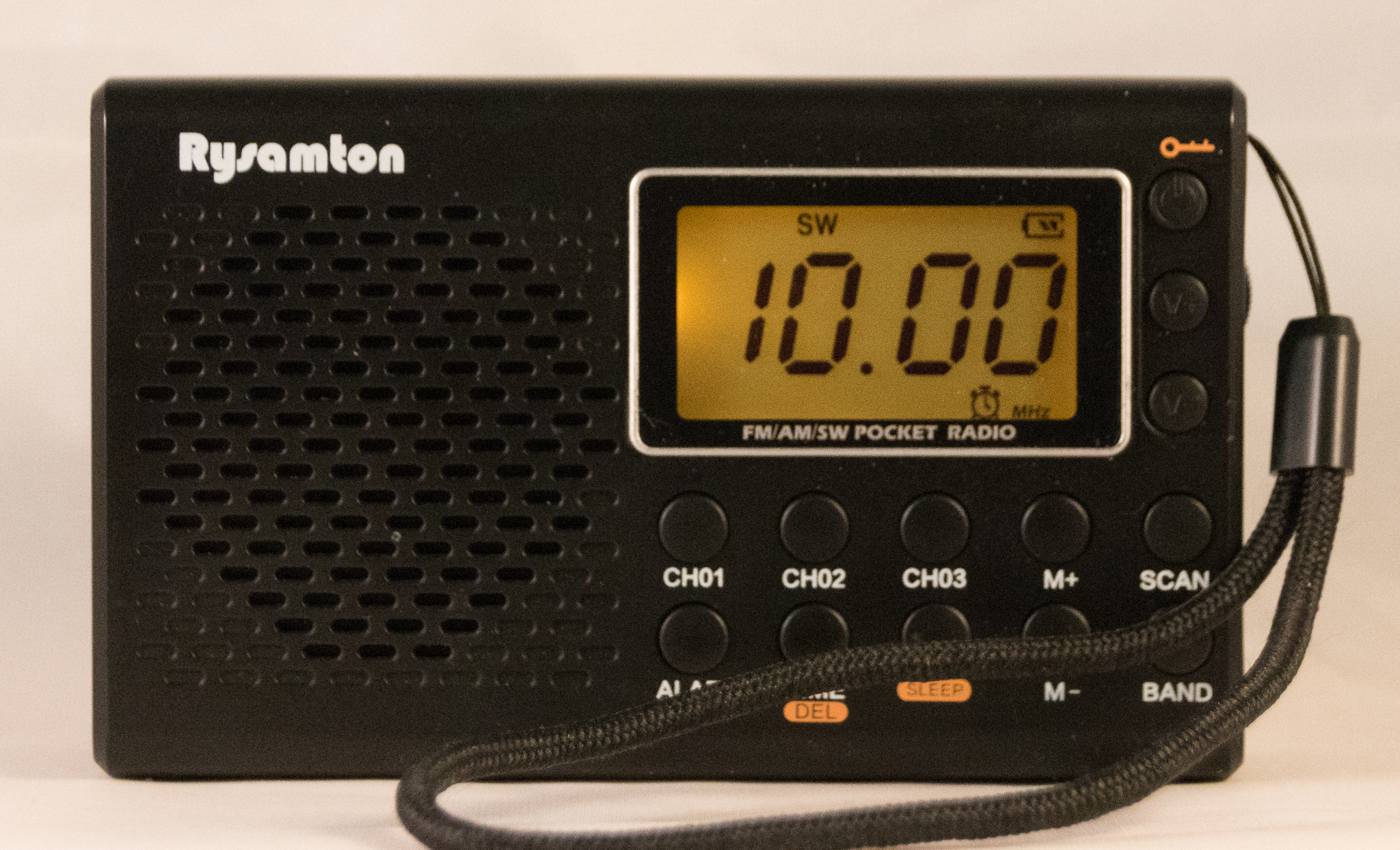
In an attempt to give each of my radios at least a little love, I pulled down my Rysamton YK-M03 from the shelf today and gave it a whirl.
Features
For something with this basement price it has quite a few features including: 12/24 hour click, alarm, sleep timer, earphone jack and earphones (included), dial light, auto tune storage, favorite station buttons, digital frequency display, carry strap, English manual and a lock button. It supports both US and European frequency ranges for MW/FM. There is FM stereo with headphones. The clock is visible with the radio off, and can operate for months on a battery charge. The display and button labels are very easy to read, as can be seen in the photo.
The photo preceding is with the radio off, where only the time, alarm, lock status and battery status is shown. When on, the radio indicates the sleep timer, alarm, frequency, stereo battery status, key lock, MHz/kHz and band. Dimensions are 115 x 70 x 31 mm.
Tuning is accomplished with a tuning knob, plus the ability to skip through the SW bands (long press the BAND button). Shortwave coverage is a fairly generous continuous spectrum from 3.0 to 21.85 MHz.
The unit is powered by 2 AA batteries, or a 3V center-+ external power supply (not included). There’s nothing in the manual about charging the batteries from the external supply.
The manual is printed front an back on an oversized sheet, and appears complete, well-illustrated and in fine English. I give it an “A” grade.
The features are offset by some limitations. The digital frequency display is limited to 4 digits so you can’t distinguish between 10.000 MHz and 10.005 MHz, although you can apparently tune them separately. There is no direct frequency entry and stations cannot be added to ATS memory manually, but you can delete them. The MW and FM tuning ranges cannot be set independently.
Auto Tune Storage (ATS)
I included this radio in my article on Radio Memory Systems, and I’ll copy that section following:
The Rysamton YK-M03 is a budget, few-frills radio, but it features 105 memories (35 each for MW, FM and SW), and it also has three “favorite” stations buttons for each band (CH01, CH02 and CH03).
There is no manual storage of stations in memory, beyond the favorites. Memory stations are stored by the radio’s ATS. The operator can delete a station from memory with a long press of the TIME/DEL button.
Long press the SCAN button to start the ATS search for the currently selected band. The M+/M- buttons scroll through the collected stations.
There are a woefully inadequate 35 memory locations each for MW, SW, and FM. With an external antenna, the SW memories will fill up long before going half way through the SW spectrum. FM ATS suffers from a fair number of empty stations stored, so it too fills up the memories before reaching the end.
Long-pressing the BAND button in shortwave mode tabs through the 9 individual shortwave bands: 3, 4,75, 5.95, 7.1, 9.5, 11.65, 13,6, 15,1, 17.5, and 21.45 MHz. Tuning is then accomplished by turning a wheel on the side of the radio. I intuitively expect that a clockwise turn of a wheel increases frequency, but in this case it’s a decrease.
Settings
To set the MW step, turn the radio off (what the manual describes as “standby mode”). Then hold down the M+ key until it displays 9 or 10 kHz. Use the V+/V- keys to change the setting. After 3 seconds, the radio will resume “standby mode.” When the value is 9 kHz, the FM range becomes 76-108 MHz, and when 10 kHz, the FM range becomes 87-108 MHz.
Setting the Clock
A long press of the TIME / DEL key when the unit is off enters time setting mode, first to set the 12 or 24 hour format; press the V+/V- keys to change. Press TIME again to enter hour setting mode; adjust with the V+/V- keys. Press TIME once more to enter minute setting mode. One final press of TIME exits time setting mode, or just wait 3 seconds. At any point in the time setting process, a delay of 3 seconds saves the current state and exits the mode.
Performance
I clipped on an MLA-30+ antenna and ran ATS on shortwave. The radio stored 35 stations and stopped when the memory filled somewhere around 9000 kHz. Most were real stations, but a few were just noise. At around 9 PM in the evening I was able to receive CHU on 3330 and 7850 kHz for example here in central Virginia.
At a previous sitting, I tried the radio on shortwave with just the whip antenna. I got WWCR on 9980 (and 9350) and CHU Canada on 7850 with clear strong signals on the 17″ whip antenna. Also heard, Radio Nacional Amazonia (Brazil) on 11780, Radio Feda (Madagascar) on 11610 and Radio Exterior Espana (Spain) on 9690 — all clear. I heard some ham radio traffic. Normally, I wouldn’t even try to use a portable radio on its whip inside next to the computer.
Here are the FM/MW daytime results:
MW is awful, but the radio is no slouch on FM.
Audio
The 0.5W speaker sounds awfully tinny and one would probably not want to listen to this radio for music, but with a good set of headphones, the radio doesn’t sound bad even though there’s no bass, and with headphones there is FM stereo.
Value
I bought the radio for $12.92 back in December of 2022 from Amazon. It’s $12.74 today after a 15% coupon. So is this radio worth $13? If the radio just sits on the shelf or in the box and is never used, then it’s worth nothing. The speaker is so tinny that one would rarely use it without earphones. It’s shirt pocket sized, so one could walk or jog with it using earphones (the included earphones are pretty good). Shortwave reception is good for the price. As bargain radios go, this is a good one.
probleme de mise a l heure
This is my guess:
With the radio off, long press the TIME button. The hour digits will flash.
Use the M+ or M- buttons to set the hour. Press TIME again to confirm and move to minutes.
Use the M+ or M- buttons to set the minutes. Press TIME again to confirm.
En français :
Voici mon estimation :
Radio éteinte, appuyez longuement sur le bouton TIME. Les chiffres des heures clignotent.
Utilisez les boutons M+ ou M- pour régler l’heure. Appuyez à nouveau sur TIME pour confirmer et passer aux minutes.
Utilisez les boutons M+ ou M- pour régler les minutes. Appuyez à nouveau sur TIME pour confirmer.
Bonjour Apres plusieurs jours absent j ai renouvellé ma demande de mise a l heure; meme resultat,les heures ne clignotent pas;
M+ et M- pas de reaction
This is what the manual says:
I have ordered another radio from Amazon and when it comes, I will update this with a definitive answer.
Here is a video showing how to set the clock.
https://www.youtube.com/watch?v=lI4Btn-Az-0
Como cambio la frecuencia de AM ya que el radio viene de 9 en 9 y deseo pasarla la frecuencias que cambien de 10 a 10
[English]
From the User’s Manual:
FM frequency range and AM step setting
The device’s AM may be set to 9 kHz or 10 kHz (unit amount steadily raised
or lowered of frequency). Besides that, the FM frequency range can be
modified to satisfy your use in different countries of regions.
Del Manual del Usuario:
Rango de frecuencia FM y ajuste de paso de AM
La frecuencia AM del dispositivo puede configurarse en 9 kHz or 10 kHz (la unidad de frecuencia aumenta o disminuye gradualmente). Además, el rango de frecuencia FM se puede modificar para adaptarlo a su uso en diferentes países o regiones.
Having major problems setting the time. I followed the directions what is a long press?How do you change the numbers to the actual time. Radio plays great, but the instructions are bad my email is [redacted], would appreciate better instructions.
Thank you,
Terry Riha
First, a “long press” just means to press and hold the button for a couple of seconds until something happens.
This is the procedure to set the time:
1. With the radio off, press and hold the TIME button until “12H or “24H” flashes.
2. Release the TIME button.
3. Use the Volume controls to switch between 12 and 24 hour mode.
4. Press TIME to change to Hour setting mode. The hour will begin flashing.
5. Use the Volume controls to set the hour.
6. Press TIME to switch to the minute setting mode. The minutes will begin flashing.
7. Use the Volume controls to set the hour.
3. Press the TIME button briefly to store the time.
IMPORTANT: After 3 seconds of inactivity, the radio automatically saves the current time setting and exits time setting mode. Work Fast!
Check out this video: https://www.youtube.com/watch?v=lI4Btn-Az-0
would like a radio that records programs when i cant listen
but play later . i have heard Rysamton has one could you reccommend?
I do not know of any portable shortwave radio that has a timer to start recording when you are away. I no longer have the Rysamton YK-M03. A number of radios have the record function, including the Raddy RF75A, HanRongDa RF-757, Degen DE28, Kaito KA29, LiJiANi Rd239, Zhiwhis ZWS-603. The LiJiANi and HanRongDa are probably the best radios of the group, and the Zhiwhis is the best value.
My best guess is that it was the wrong charger and that caused the radio to fail. It should be 3V center +. I never tried to charge batteries in the radio.
i PURCHASE a model YK-M03 RYSAMTON RADIO THIS WEEK AND USED FOR TWO DAYS. WHEN I PLUGGED IN THE DC-ADAPTER IT STOPPED WORKING.
HAVE ANY THOUGHTS AS TO WHY IT STOPPED WORKING
I have the Japanese release of the Yorek branded version of this radio. Could you kindly post pictures of the operating manual in English? I’ve tried contacting the company but their website is non-existent.
Thanks in advance!
I donated this radio to charity and I no longer have the manual. Sorry.
https://www.blogordie.com/wp-content/uploads/2025/09/RYSAMTON-YK-M03.pdf
I would call this little and I do mean little radio” garbage” but that’s only because I couldn’t think of a word worse than garbage. 1) the batteries didn’t fit tightly in the battery compartment as a result the radio kept dying 2) when I put cadrboard in the battery compartment that problem was fixed but now the sound kept getting lower and lower 3) That was just as well because the radio then lit up but gave me no sound. wouldn’t recommend this radio to my enemy