Blog expands to travel topic

When this blog started, I wasn’t much of a traveler except for business. Now that I’ve retired, my wife and I travel a fair amount. “Travel” as a topic has been added to this blog and I intend to write some articles about the places I visit from my own perspective. These won’t be destination reviews—those I put on TripAdvisor.com, but more about how travel changed me.

Posted in Travel | Tagged | Leave a comment

Surface Pro 3 backup

I didn’t have a backup of my Surface Pro 3, so when it because unusable, my only option was to do a Refresh, which uninstalled all my applications, and trashed all my settings, product registrations, 100 Windows Update installations, email setup and on and on. It took about a day to put the system back together after that, and I was not able to re-install one application at all. I’m still finding things that don’t work right.

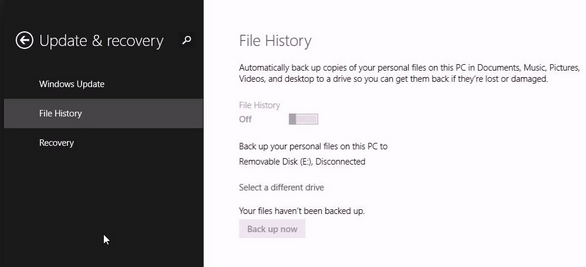
Oh, if I only had a backup. Why didn’t I have a backup? They say an image is worth a thousand words, so here is the image:

image

There is no backup except the File History “Back up now”, which only backs up user files, not the operating system or applications.

The reason I’m writing this article is to say that there really is a backup in Windows 8.1—you just can’t find it so easily. Surprisingly, the real backup is under File History, the other File History. Go to the system search and enter “File History” and select the one that has a picture of a folder next to it. This takes you to the desktop. In small type in the extreme lower left of the File History window, there is a “System Image Backup” link that lets you really back up your computer.

To restore, restart your computer while holding down the F8 key (yes, you need a keyboard). Then use the Advanced Repair Options.

Posted in Microsoft Surface | Tagged , | Leave a comment

Switching browsers

I’ve been a Firefox user for a long time, too long to remember (and before that Netscape Navigator 2.0 and before that Mosaic). I preferred Firefox to Internet Explorer because it implemented cool features, like multiple page tabs and private browsing. Internet Explorer and other browsers followed to implement these features, and for my purposes they are now functionally equivalent.

image

As for general layout and appearance, I prefer Firefox, but I have had a number of instances of Firefox locking up lately, and there are some other problems with it not accurately positioning to in-page links, such as a comment on a blog. A big problem is printing a web page to a PDF using the Adobe Acrobat 9.5 driver—some text comes out gibberish. I was looking for an improvement.

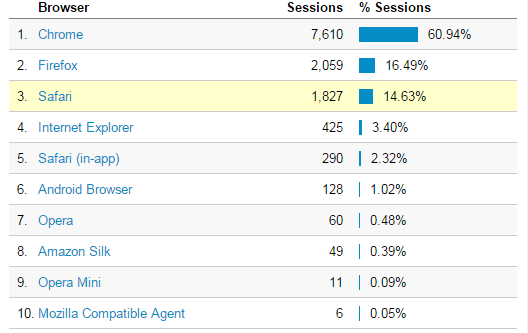
Here’s how it happened. My other blog had a huge 2-day spike in readership last week and when I examined the source, it was a link from reddit.com. I looked at the browser distribution in Google Analytics and was surprised to see that the younger-aged folks visiting through Reddit use Google Chrome 61% of the time (and hardly any of them use Internet Explorer).

image

General usage worldwide web statistics show Google Chrome running around 40% of the time, with Firefox and Internet Explorer at around 20%.

It was time to reconsider my browser choice. I’ve had Chrome installed for ages but used it only on rare instances, mostly for testing. I took the plunge and imported all my Firefox passwords and bookmarks into Chrome (pretty painless once I removed the master password in Firefox) and I set it to be the default browser.

Everything is working well so far. The two problems I had with Firefox aren’t a problem with Chrome. I like the language translation feature built into Chrome, and I like its ability to synchronize bookmarks and passwords across devices (Firefox has this too, but it only works with passwords when you don’t have a master password). I’ve uninstalled Firefox from my tablets entirely.

Internet Explorer in its current incarnation is a very good browser in my opinion, and for technical reasons, it will remain the default on my Windows tablets for now. It is also the only one of the three that has a tablet-centric mode of operation that I know about. There are also some web sites that only work properly with Internet Explorer.

Posted in Technology | Tagged , , , | Leave a comment

Undervotes in the 2014 South Carolina General Election

The Wikipedia says: “An undervote occurs when the number of choices selected by a voter in a contest is less than the minimum number allowed for that contest or when no selection is made for a single choice contest.”1 Undervotes can be intentional or not. This paper examines the question of whether there was some systemic explanation for undervotes in South Carolina in 2014.

I was a poll worker in the 2014 General Election in South Carolina, and had first-hand experience with the setup and operation of the electronic voting machines used by the state. I also had first-hand experience with problems reported by voters trying the use the machines. There were not many problems reported, but in three instances voters who believed that they had completed their ballot found upon review that no votes at all were recorded. In one instance where I was personally requested by the voter to assist, I observed a review screen where a straight-party vote was recorded, but no individual votes were recorded (the straight party vote should have caused the machine to mark every candidate of that party in every race). In one instance a voter requested assistance in choosing not to complete a write-in vote and after pressing the Cancel button on the write-in screen it was observed that no votes appeared for any race, something which the voter stated was wrong. One voter protested that the review screen repeatedly showed no votes for races he had voted in, and gone back to correct. In each problem case, the solution of “try it again” resulted in a ballot where the review screen showed what the voter intended.

One issue with the aging voting South Carolina machines is that in some circumstances, pressing the box on the screen to record a vote does not record a vote, and no visual indicator appears on the ballot screen. In one instance, poll workers worked for several minutes to try to get one checkbox to activate during the initial setup of the machine. This was an extreme and anomalous occurrence, but during the day several voters reported that they had to press the selection multiple times.

This analysis was originally promoted by my concern over whether there was some undesirable flaw in the voting machines that could lose votes, and whether some voters who didn’t pay attention to the review screens may have lost votes.

South Carolina considers votes to be public records. The voting machines do not know the identity of the voter, and a randomized detail log of individual votes cast does not compromise the privacy of any individual voter.2 A log of every vote cast,  called the EL155 file, is available in randomized order from the South Carolina Elections Commission web site for each county and election.

Documentation of the EL155 file could not be found by me on the Internet, but the layout was for the most part self explanatory. My first step was to load the raw EL155 data into a relational database to allow for easy tabulation using SQL queries.

References:


1Undervotes do not disqualify ballots in South Carolina.

2One voter told me that he did not believe his vote was secret and that “they” would know how he voted. I told the voter that “the machine doesn’t know who you are,” but he didn’t seem satisfied.

3In this case, Microsoft SQL Server 2008.

Posted in Elections | Tagged , | Leave a comment

South Carolina’s Voter ID law

Before I discuss what I think of the law, let me tell you first what it is and what you need in order to vote in the November 4, 2014 election.

South Carolina’s new Voter ID law went into effect January 1, 2013. In order to cast a regular ballot in the election, you must present a qualifying photo ID–one of the following 5 items:

  • A South Carolina Driver’s License. Suspended licenses DO NOT QUALIFY.
  • An ID card issued by the South Carolina Department of Motor Vehicles.
  • A US Passport.
  • A US Military ID (includes military contractor IDs issued by the Department of Defense and VA benefit and spousal benefit cards so long as these have a photo).
  • A South Carolina Elections Commission voter registration card WITH PHOTO. Older cards do not have a photo.

If the ID has an expiration date on it, it must not have expired to be considered valid. Student ID’s and concealed weapons permits DO NOT QUALIFY as an ID for voting purposes.

You can go to your county elections commission and get a free voter registration card with your photo on it. This process requires you to give your social-security number, but you do not have to have a birth certificate.

If you show up at the polls without an ID, there is a process for determining your options. If you have an ID, but forgot it, you can go home and get it. If you don’t have an ID and no good reason for not having one, you can vote a provisional (paper) ballot BUT you will have to present an ID to your county elections commission before the date of for finalizing the ballots (the Friday following the election) in order for your ballot to count. If you don’t have and ID and there is a reasonable impediment to your getting one, you bring your voter registration card (without photo), sign an affidavit saying that you have a reasonable impediment to getting and ID, vote a provisional ballot, and if the county elections commission has no reason to doubt the truth of your affidavit, your vote will count.

In order to vote, you must register to vote within 30 days of the election. You can register to vote online. Of course it’s too late to do that for the November 4, 2014 election.

What do I think?

In a recent training session for new poll managers, the head of the Spartanburg County Elections Commission, Henry Laye, was asked how prevalent election fraud was. He stated that since he had been head of the department (more than a few years), there have been no instances of election fraud in the county. That suggests that all of the education, training, publicity, and general confusion about the SC Voter ID Law is for nothing. It is a total waste of time, energy and money. It is a solution without a problem.

Given that the law exists, the details are not bad. It doesn’t cost anything to get an ID. I’ve visited my own county elections commission office several times, and I have never seen anyone waiting to get an ID. It should be a pretty quick process. And if someone doesn’t have an ID for a good reason (and they are the sole judge of what is a good reason), they can vote a paper ballot and it will count.

The problem is that the 5 forms of required ID are prominently displayed, and publicized. The reasonable impediment exception is in small print or on the back of the brochure. Someone who doesn’t have an ID for a good reason may believe that they cannot vote, when in fact they can. That basically stacks the deck against those who don’t have an ID. Anything that makes the playing field un-level is, in my opinion, a bad thing.

Posted in Politics | Tagged | Leave a comment

A call from the Windows technical department

I just got a peculiar telephone call on my house phone. A woman with an accent that suggested that she was from India or Pakistan, said that she was from the “Windows technical department” and was calling me about my computer. She said that there were errors detected on the “main Windows server” and that she was calling to help me walk through solving the problem.

In the heat of the moment, one doesn’t necessarily think of every reason why something like this makes no sense. I had just posted some questions on a Windows forum about how to stream DirecTV video to my Surface tablet, and I’m a frequent user of Microsoft OneDrive which involves Microsoft servers. My brain wanted to file this under those topics, although I knew it didn’t fit. Still my scam alert went off immediately because Microsoft (a word she didn’t use) doesn’t call people like that, and there is no “main Windows server.”

I stayed on the line to get an idea of what was going on because this particular approach at social engineering was novel to me. So she asked me if I was in front of my Windows computer (which I was). My reply was “which computer?” She said, your Windows computer that you are using at that location. I said: “Which one? I have several Windows computers.” She hung up.

After the call, I noted other anomalies:

  1. They never asked for me by name. If Microsoft knew my phone number, they would have had my name also.
  2. They never mentioned Microsoft
  3. How could they know I had an error?

I found references to scams like this going back to 2010. Usually the caller will eventually ask for a fee to help remove a virus. They might also ask for remote access to the computer and then they could plant malicious software to steal passwords and financial information.

Surprisingly, Microsoft may actually call you about an infected computer, according this Microsoft article (may require a Microsoft account login to read). Here is the relevant portion:

There are some cases where Microsoft will work with your Internet service provider and call you to fix a malware-infected computer—such as during the recent cleanup effort begun in our botnet takedown actions. These calls will be made by someone with whom you can verify you already are a customer. You will never receive a legitimate call from Microsoft or our partners to charge you for computer fixes.

Read more:

Posted in Scams, Technology | Tagged , | Leave a comment

A couple of hummingbirds

I shot some video just now of a couple of ruby-throated hummingbirds at the feeder, looping and diving and just being amazing.

Update:

I switched this to YouTube as some folks were having problems viewing the native-hosted version. When viewing full screen, use the YouTube settings icon to switch to 1080 p HD.

Posted in Nature | Tagged , | Leave a comment