Undervotes in the 2014 South Carolina General Election

The Wikipedia says: “An undervote occurs when the number of choices selected by a voter in a contest is less than the minimum number allowed for that contest or when no selection is made for a single choice contest.”1 Undervotes can be intentional or not. This paper examines the question of whether there was some systemic explanation for undervotes in South Carolina in 2014.

I was a poll worker in the 2014 General Election in South Carolina, and had first-hand experience with the setup and operation of the electronic voting machines used by the state. I also had first-hand experience with problems reported by voters trying the use the machines. There were not many problems reported, but in three instances voters who believed that they had completed their ballot found upon review that no votes at all were recorded. In one instance where I was personally requested by the voter to assist, I observed a review screen where a straight-party vote was recorded, but no individual votes were recorded (the straight party vote should have caused the machine to mark every candidate of that party in every race). In one instance a voter requested assistance in choosing not to complete a write-in vote and after pressing the Cancel button on the write-in screen it was observed that no votes appeared for any race, something which the voter stated was wrong. One voter protested that the review screen repeatedly showed no votes for races he had voted in, and gone back to correct. In each problem case, the solution of “try it again” resulted in a ballot where the review screen showed what the voter intended.

One issue with the aging voting South Carolina machines is that in some circumstances, pressing the box on the screen to record a vote does not record a vote, and no visual indicator appears on the ballot screen. In one instance, poll workers worked for several minutes to try to get one checkbox to activate during the initial setup of the machine. This was an extreme and anomalous occurrence, but during the day several voters reported that they had to press the selection multiple times.

This analysis was originally promoted by my concern over whether there was some undesirable flaw in the voting machines that could lose votes, and whether some voters who didn’t pay attention to the review screens may have lost votes.

South Carolina considers votes to be public records. The voting machines do not know the identity of the voter, and a randomized detail log of individual votes cast does not compromise the privacy of any individual voter.2 A log of every vote cast,  called the EL155 file, is available in randomized order from the South Carolina Elections Commission web site for each county and election.

Documentation of the EL155 file could not be found by me on the Internet, but the layout was for the most part self explanatory. My first step was to load the raw EL155 data into a relational database to allow for easy tabulation using SQL queries.

References:


1Undervotes do not disqualify ballots in South Carolina.

2One voter told me that he did not believe his vote was secret and that “they” would know how he voted. I told the voter that “the machine doesn’t know who you are,” but he didn’t seem satisfied.

3In this case, Microsoft SQL Server 2008.

Posted in Elections | Tagged , | Leave a comment

South Carolina’s Voter ID law

Before I discuss what I think of the law, let me tell you first what it is and what you need in order to vote in the November 4, 2014 election.

South Carolina’s new Voter ID law went into effect January 1, 2013. In order to cast a regular ballot in the election, you must present a qualifying photo ID–one of the following 5 items:

  • A South Carolina Driver’s License. Suspended licenses DO NOT QUALIFY.
  • An ID card issued by the South Carolina Department of Motor Vehicles.
  • A US Passport.
  • A US Military ID (includes military contractor IDs issued by the Department of Defense and VA benefit and spousal benefit cards so long as these have a photo).
  • A South Carolina Elections Commission voter registration card WITH PHOTO. Older cards do not have a photo.

If the ID has an expiration date on it, it must not have expired to be considered valid. Student ID’s and concealed weapons permits DO NOT QUALIFY as an ID for voting purposes.

You can go to your county elections commission and get a free voter registration card with your photo on it. This process requires you to give your social-security number, but you do not have to have a birth certificate.

If you show up at the polls without an ID, there is a process for determining your options. If you have an ID, but forgot it, you can go home and get it. If you don’t have an ID and no good reason for not having one, you can vote a provisional (paper) ballot BUT you will have to present an ID to your county elections commission before the date of for finalizing the ballots (the Friday following the election) in order for your ballot to count. If you don’t have and ID and there is a reasonable impediment to your getting one, you bring your voter registration card (without photo), sign an affidavit saying that you have a reasonable impediment to getting and ID, vote a provisional ballot, and if the county elections commission has no reason to doubt the truth of your affidavit, your vote will count.

In order to vote, you must register to vote within 30 days of the election. You can register to vote online. Of course it’s too late to do that for the November 4, 2014 election.

What do I think?

In a recent training session for new poll managers, the head of the Spartanburg County Elections Commission, Henry Laye, was asked how prevalent election fraud was. He stated that since he had been head of the department (more than a few years), there have been no instances of election fraud in the county. That suggests that all of the education, training, publicity, and general confusion about the SC Voter ID Law is for nothing. It is a total waste of time, energy and money. It is a solution without a problem.

Given that the law exists, the details are not bad. It doesn’t cost anything to get an ID. I’ve visited my own county elections commission office several times, and I have never seen anyone waiting to get an ID. It should be a pretty quick process. And if someone doesn’t have an ID for a good reason (and they are the sole judge of what is a good reason), they can vote a paper ballot and it will count.

The problem is that the 5 forms of required ID are prominently displayed, and publicized. The reasonable impediment exception is in small print or on the back of the brochure. Someone who doesn’t have an ID for a good reason may believe that they cannot vote, when in fact they can. That basically stacks the deck against those who don’t have an ID. Anything that makes the playing field un-level is, in my opinion, a bad thing.

Posted in Politics | Tagged | Leave a comment

A call from the Windows technical department

I just got a peculiar telephone call on my house phone. A woman with an accent that suggested that she was from India or Pakistan, said that she was from the “Windows technical department” and was calling me about my computer. She said that there were errors detected on the “main Windows server” and that she was calling to help me walk through solving the problem.

In the heat of the moment, one doesn’t necessarily think of every reason why something like this makes no sense. I had just posted some questions on a Windows forum about how to stream DirecTV video to my Surface tablet, and I’m a frequent user of Microsoft OneDrive which involves Microsoft servers. My brain wanted to file this under those topics, although I knew it didn’t fit. Still my scam alert went off immediately because Microsoft (a word she didn’t use) doesn’t call people like that, and there is no “main Windows server.”

I stayed on the line to get an idea of what was going on because this particular approach at social engineering was novel to me. So she asked me if I was in front of my Windows computer (which I was). My reply was “which computer?” She said, your Windows computer that you are using at that location. I said: “Which one? I have several Windows computers.” She hung up.

After the call, I noted other anomalies:

  1. They never asked for me by name. If Microsoft knew my phone number, they would have had my name also.
  2. They never mentioned Microsoft
  3. How could they know I had an error?

I found references to scams like this going back to 2010. Usually the caller will eventually ask for a fee to help remove a virus. They might also ask for remote access to the computer and then they could plant malicious software to steal passwords and financial information.

Surprisingly, Microsoft may actually call you about an infected computer, according this Microsoft article (may require a Microsoft account login to read). Here is the relevant portion:

There are some cases where Microsoft will work with your Internet service provider and call you to fix a malware-infected computer—such as during the recent cleanup effort begun in our botnet takedown actions. These calls will be made by someone with whom you can verify you already are a customer. You will never receive a legitimate call from Microsoft or our partners to charge you for computer fixes.

Read more:

Posted in Scams, Technology | Tagged , | Leave a comment

A couple of hummingbirds

I shot some video just now of a couple of ruby-throated hummingbirds at the feeder, looping and diving and just being amazing.

Update:

I switched this to YouTube as some folks were having problems viewing the native-hosted version. When viewing full screen, use the YouTube settings icon to switch to 1080 p HD.

Posted in Nature | Tagged , | Leave a comment

Take two tablets…

In my continuing quest to find the perfect device, I bought a Surface 3 Pro (I5, 128 GB) today at Best Buy, along with the Type keyboard and a sleeve.

My venerable XPS Dell laptop from January 2008 has been a sweet machine, but its limited resolution makes the screen too small for some modern applications. Also since I upgraded it to Windows 8 (from Windows 7, upgraded from Vista), it’s been running hotter and the fan is making noise. Since the primary use for this machine now is audio recording, noise is a problem. The Surface 2 RT I have won’t run the recording application, Audacity, nor my own LVTool, so EBay is the destination for the Surface 2; I don’t know what I’ll do with the laptop yet.

The Surface 3 Pro is marketed as both a tablet and a laptop replacement. Reducing the number of devices is always a win, so what I am hoping to accomplish is to get a laptop replacement and a killer tablet in one device.

I had a license for Office 2010 and I put that on. (The laptop had Office 2007.) This Surface (unlike the RT models) does not come with Office. Deleting the preinstalled but unlicensed copy of Office 2013 freed up 2.1 GB of storage. I also installed a 64 GB MicroSD card where I’m putting the file history. I have it encrypted. The Surface 3 comes with a Bluetooth stylus.

Laptop replacement

The tablet has a little less storage than the laptop (128 GB vs. 160) but the laptop wasn’t full, and it had stuff on it I never used. Also the 64 GB MicroSD card brings the tablet ahead of the laptop, and that’s where my file history and media go. The tablet screen is a little smaller (12” vs. 13”) but the resolution is much higher with the tablet at 2160 x 1440, where the laptop was only 1280 x 800. (My huge desktop monitor is only 1920 x 1080!)

I don’t like track pads, and the Surface 3 is no exception. Things happening that I didn’t intend gets old very fast. Put bluntly, I don’t like the Surface 3 track pad. I rarely used the track pad on my laptop either (although it’s better), opting for a mouse, so the track pad won’t make any difference to me. I think I’m going to like the Surface 3 keyboard apart from the track pad. It always takes a while to get comfortable with a new keyboard. About the only thing I cannot do with the Surface is mount a DVD. That is somewhat offset by the ability of Windows 8 to mount ISO files. I think that the tablet is going to work as a laptop replacement, using the Surface 3 keyboard and a Bluetooth mouse.

Tablet

The tablet role is different. What I like about the Surface 3 Pro as a tablet is the excellent Bluetooth stylus. Handwriting is excellent, and the ability to navigate the Windows desktop with it takes care of the problems in doing that with your finger, which is too big for the user interface. Scroll bars now work. A special button starts the One Note application, which unlike the rest of Office, is bundled with the tablet.1

Size matters
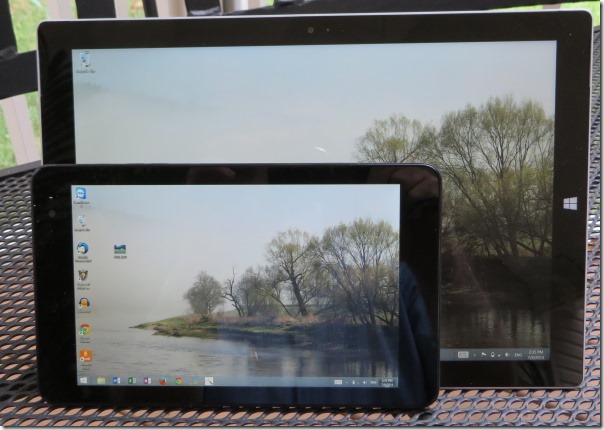
tabletcompare

The photo above shows the Dell Venue 8 Pro tablet up next to the Surface 3 Pro. The Venue is right at one half the weight and one half the footprint area of the Surface, and therein lies the quandary.  The Dell, the size of a paperback book, is too small to do much useful work, and the Surface is too big to just grab and go. Coincidentally, the Dell Venue 8 Pro has exactly the same screen resolution as my old laptop, 1280 x 800.

My Dell came with a fold over Dell case that doubles as a stand; the Surface has an integrated kickstand, and its keyboard provides the cover, with an added weight penalty. I bought a sleeve for the Surface just for added protection. I rarely used the sleeve I got for the Surface 2 and that may prove the case here.

It is ironic that the Dell Venue 8 Pro that I would consider unusable without a stylus, comes without a stylus, while the Surface billed as a laptop replacement comes with a stylus, but without a keyboard.

One other criterion for choosing which tablet to carry is the lack of a standard USB port on the Dell (for USB you need an “On the Go” cable, available at Staples or online). The Surface has a standard USB 3.0 port. Connecting HDMI  video is messy with both tablets. The Surface requires a $39.99 adapter. I think the Venue is more complicated.

I am currently thinking that while I can do without a laptop, I can’t work well with only one tablet. The Dell will be the thing I will just grab when I go somewhere, where I won’t need heroic battery life, and where the most input I will ever do is type a URL or a password. The Surface will go when I know I have some productivity task to accomplish, or when I need it to run all day without recharging the battery.

Update:

I had my first laptop replacement session with the Surface 3 Pro, recording an audiobook chapter. Overall it worked well, although there were two snags.

A USB hub was required to use my wireless USB mouse, and my Blue Yeti USB microphone at the same time. That worked OK, but when I plugged in a USB flash drive as the third device on the hub, it became unstable. That flash drive must draw a lot of power because it’s always hot after I use it. So it appears that the amount of power available at the USB 3.0 port is not limitless (or it could be the hub). I got a powered hub and that solved this special problem. I could also have just used a Bluetooth mouse to reduce the number of devices on the hub and that might have worked. The microphone could be a power hog too.

The other thing that came up has to do with the display: The mouse cursor is really tiny in the Audacity application.

Update 2:

The infinitely variable kickstand is a real winner. The Type keyboard can be folded around as a stand for your lap, and then the kickstand at a low angle makes a virtually perfect angle for lap use. It is extremely stable and sets both hands free. This is a really nice feature. I tried to accomplish the same thing with the Dell Venue 8 Pro and the Dell flip cover, but it was totally unstable.

Update 3:

Before I got the Surface, I did my audio recording on a laptop upstairs where things are quiet. After recording, I would move the audio files to my desktop computer for editing and uploading. This week, I tried doing everything on the Surface, and that worked superbly. Audacity exported the MP3 files at about the same speed as the quad core desktop, and not having to copy the large audio files either to a USB drive or across the Wi-Fi network is a definite time saver. I have massive amounts of “stuff” on my desktop computer, but the Surface continues to get used more and more.

Update 4:

It’s been 4 months now, and I don’t turn on my laptop anymore. The Dell tablet gets very little use. Things have settled down between the desktop system where all the heavy lifting gets done, and the Surface Pro that handles everything portable. I’ve said that the Surface Pro is too big to grab and go, but I find myself doing just that. I rarely use the sleeve I bought, using just the type cover to protect the display.


1I found out that the version of OneNote that comes with the Surface is not the full version that is a part of Office. The big missing item is that it doesn’t do character recognition when you write with the stylus. While you can start Office OneNote with the stylus button when installing Office 2013, it won’t work with earlier versions of Office, like the 2010 I installed. The pre-installed OneNote thing proved mostly a disappointment.

Update 5 (2024):

Time passes. The Surface Pro 3 got stepped on and the screen cracked. I replaced it with a Surface Pro 5th Edition that is still working very well. It’s been updated to Windows 10, but won’t run Windows 11. I don’t know what happened to the Dell Venue 8 tablet, but it’s long gone. I also have a Dell Venue 7 Android tablet that Dell sent me for free bundled with a desktop system. It won’t run later versions of Android and cannot connect to the app store any more. It’s useless.

Posted in Microsoft Surface | Tagged , , | 2 Comments

Fix for OneDrive Application Error Event ID 1000

This started happening sometime in the last week and a half. I couldn’t turn on the Windows 8.1 option to make all files available offline. There was this message: "you can’t turn on this setting while Onedrive is being set up." The Application Error was in the Event Log.

I had this both on Windows 7 and Windows 8.1. Uninstalling OneDrive and then reinstalling fixed the problem for Windows 7.

For Windows 8.1, I found a hint on a Microsoft forum to enter (in a Command Window):

SkyDrive.exe /reset

It runs a while and everything was fixed. Took two hours wading through junk to find the hint.

Otherwise, I still love OneDrive. It just keeps solving more and more problems.

Posted in Microsoft Surface, Technology | Tagged , , , | 1 Comment

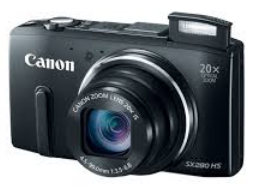
Canon SX280 HS low battery indicator problem

I’ve used a variety of Canon products over the years, and it’s a name I have come to trust. It was with a bit of a shock that I discovered the controversy about the low-battery indicator for the Canon PowerShot SX 280 HS after I bought one and had the problem. If you’re interested in the history of this, there are two items I would suggest:

imageMy new camera came with the latest firmware and it supposedly fixed the issue of the camera flashing low battery when taking a movie, even though the battery is nearly full. What the customer sees is that their battery indicator shows 2 or 3 out of 3 bars, but when they switch to movie mode, the low battery indicator flashes immediately or after taking a minute of video. The camera may decide to shut down. Turning the camera back on restores the battery indicator to show the battery near full.

There are, in my opinion, several factors working together to create this problem in the perceived operation of the camera. The first is that the camera is underpowered. The standard 1000 mAh battery is only rated for 200-400 photos or 25 minutes of video. The camera gets noticeably hot when taking long video shots, indicating the power drain. This camera can be a battery hog especially if you use the Wi-Fi and the GPS features. The second factor is common to rechargeable batteries: new ones require a few charging cycles to reach maximum capacity. The third issue is that this camera reportedly requires a huge amount of power to zoom while taking video. Finally, it appears that the battery indicator operates differently depending on camera mode—what’s a nearly full battery for taking snapshots is a nearly empty battery when taking movies. The indicator may well be working correctly for each mode, representing what the camera can do in that mode, but it is confusing when switching back and forth. It appears to me that in movie mode, the battery indicator is overly pessimistic. I take photos, plus an occasional video, so I rely on the photo setting to gauge my battery life, and then am surprised when I find the battery depleted in movie mode.

My experimentation revealed that I got better battery life on the second charge cycle than on the first. I found that on the second charge I could take 39 minutes of video (in two long segments) zooming twice briefly, 6 snapshots, and still have battery left. Now during a good portion of that video shoot the low battery indicator was flashing, but the camera worked OK. The video was shot at the maximum resolution of 1920 x 1280  at 30 fps.

I found NB-6L replacement batteries by EZO at Newegg,  two for $14.99. They have the same 1000 mAh rating as the original equipment battery. At that price it’s practical to carry extra batteries when shooting all day. Note: I haven’t used these batteries yet and so this is not a recommendation of the brand.

The camera is new and I haven’t used it nearly enough to form an overall impression. The battery issue is confusing, but it’s not that big a deal. I decided to keep the camera and not return it.

Posted in Bad Commerce | Tagged , , | 5 Comments