Take two tablets…

In my continuing quest to find the perfect device, I bought a Surface 3 Pro (I5, 128 GB) today at Best Buy, along with the Type keyboard and a sleeve.

My venerable XPS Dell laptop from January 2008 has been a sweet machine, but its limited resolution makes the screen too small for some modern applications. Also since I upgraded it to Windows 8 (from Windows 7, upgraded from Vista), it’s been running hotter and the fan is making noise. Since the primary use for this machine now is audio recording, noise is a problem. The Surface 2 RT I have won’t run the recording application, Audacity, nor my own LVTool, so EBay is the destination for the Surface 2; I don’t know what I’ll do with the laptop yet.

The Surface 3 Pro is marketed as both a tablet and a laptop replacement. Reducing the number of devices is always a win, so what I am hoping to accomplish is to get a laptop replacement and a killer tablet in one device.

I had a license for Office 2010 and I put that on. (The laptop had Office 2007.) This Surface (unlike the RT models) does not come with Office. Deleting the preinstalled but unlicensed copy of Office 2013 freed up 2.1 GB of storage. I also installed a 64 GB MicroSD card where I’m putting the file history. I have it encrypted. The Surface 3 comes with a Bluetooth stylus.

Laptop replacement

The tablet has a little less storage than the laptop (128 GB vs. 160) but the laptop wasn’t full, and it had stuff on it I never used. Also the 64 GB MicroSD card brings the tablet ahead of the laptop, and that’s where my file history and media go. The tablet screen is a little smaller (12” vs. 13”) but the resolution is much higher with the tablet at 2160 x 1440, where the laptop was only 1280 x 800. (My huge desktop monitor is only 1920 x 1080!)

I don’t like track pads, and the Surface 3 is no exception. Things happening that I didn’t intend gets old very fast. Put bluntly, I don’t like the Surface 3 track pad. I rarely used the track pad on my laptop either (although it’s better), opting for a mouse, so the track pad won’t make any difference to me. I think I’m going to like the Surface 3 keyboard apart from the track pad. It always takes a while to get comfortable with a new keyboard. About the only thing I cannot do with the Surface is mount a DVD. That is somewhat offset by the ability of Windows 8 to mount ISO files. I think that the tablet is going to work as a laptop replacement, using the Surface 3 keyboard and a Bluetooth mouse.

Tablet

The tablet role is different. What I like about the Surface 3 Pro as a tablet is the excellent Bluetooth stylus. Handwriting is excellent, and the ability to navigate the Windows desktop with it takes care of the problems in doing that with your finger, which is too big for the user interface. Scroll bars now work. A special button starts the One Note application, which unlike the rest of Office, is bundled with the tablet.1

Size matters
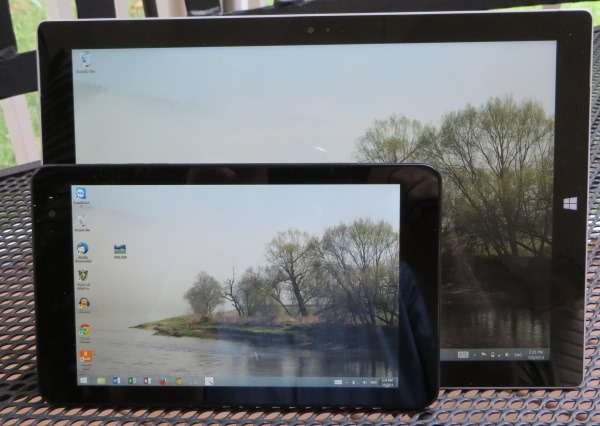
tabletcompare

The photo above shows the Dell Venue 8 Pro tablet up next to the Surface 3 Pro. The Venue is right at one half the weight and one half the footprint area of the Surface, and therein lies the quandary.  The Dell, the size of a paperback book, is too small to do much useful work, and the Surface is too big to just grab and go. Coincidentally, the Dell Venue 8 Pro has exactly the same screen resolution as my old laptop, 1280 x 800.

My Dell came with a fold over Dell case that doubles as a stand; the Surface has an integrated kickstand, and its keyboard provides the cover, with an added weight penalty. I bought a sleeve for the Surface just for added protection. I rarely used the sleeve I got for the Surface 2 and that may prove the case here.

It is ironic that the Dell Venue 8 Pro that I would consider unusable without a stylus, comes without a stylus, while the Surface billed as a laptop replacement comes with a stylus, but without a keyboard.

One other criterion for choosing which tablet to carry is the lack of a standard USB port on the Dell (for USB you need an “On the Go” cable, available at Staples or online). The Surface has a standard USB 3.0 port. Connecting HDMI  video is messy with both tablets. The Surface requires a $39.99 adapter. I think the Venue is more complicated.

I am currently thinking that while I can do without a laptop, I can’t work well with only one tablet. The Dell will be the thing I will just grab when I go somewhere, where I won’t need heroic battery life, and where the most input I will ever do is type a URL or a password. The Surface will go when I know I have some productivity task to accomplish, or when I need it to run all day without recharging the battery.

Update:

I had my first laptop replacement session with the Surface 3 Pro, recording an audiobook chapter. Overall it worked well, although there were two snags.

A USB hub was required to use my wireless USB mouse, and my Blue Yeti USB microphone at the same time. That worked OK, but when I plugged in a USB flash drive as the third device on the hub, it became unstable. That flash drive must draw a lot of power because it’s always hot after I use it. So it appears that the amount of power available at the USB 3.0 port is not limitless (or it could be the hub). I got a powered hub and that solved this special problem. I could also have just used a Bluetooth mouse to reduce the number of devices on the hub and that might have worked. The microphone could be a power hog too.

The other thing that came up has to do with the display: The mouse cursor is really tiny in the Audacity application.

Update 2:

The infinitely variable kickstand is a real winner. The Type keyboard can be folded around as a stand for your lap, and then the kickstand at a low angle makes a virtually perfect angle for lap use. It is extremely stable and sets both hands free. This is a really nice feature. I tried to accomplish the same thing with the Dell Venue 8 Pro and the Dell flip cover, but it was totally unstable.

Update 3:

Before I got the Surface, I did my audio recording on a laptop upstairs where things are quiet. After recording, I would move the audio files to my desktop computer for editing and uploading. This week, I tried doing everything on the Surface, and that worked superbly. Audacity exported the MP3 files at about the same speed as the quad core desktop, and not having to copy the large audio files either to a USB drive or across the Wi-Fi network is a definite time saver. I have massive amounts of “stuff” on my desktop computer, but the Surface continues to get used more and more.

Update 4:

It’s been 4 months now, and I don’t turn on my laptop anymore. The Dell tablet gets very little use. Things have settled down between the desktop system where all the heavy lifting gets done, and the Surface Pro that handles everything portable. I’ve said that the Surface Pro is too big to grab and go, but I find myself doing just that. I rarely use the sleeve I bought, using just the type cover to protect the display.


1I found out that the version of OneNote that comes with the Surface is not the full version that is a part of Office. The big missing item is that it doesn’t do character recognition when you write with the stylus. While you can start Office OneNote with the stylus button when installing Office 2013, it won’t work with earlier versions of Office, like the 2010 I installed. The pre-installed OneNote thing proved mostly a disappointment.

Update 5 (2024):

Time passes. The Surface Pro 3 got stepped on and the screen cracked. I replaced it with a Surface Pro 5th Edition that is still working very well. It’s been updated to Windows 10, but won’t run Windows 11. I don’t know what happened to the Dell Venue 8 tablet, but it’s long gone. I also have a Dell Venue 7 Android tablet that Dell sent me for free bundled with a desktop system. It won’t run later versions of Android and cannot connect to the app store any more. It’s useless.

Posted in Microsoft Surface | Tagged , , | 2 Comments

Fix for OneDrive Application Error Event ID 1000

This started happening sometime in the last week and a half. I couldn’t turn on the Windows 8.1 option to make all files available offline. There was this message: "you can’t turn on this setting while Onedrive is being set up." The Application Error was in the Event Log.

I had this both on Windows 7 and Windows 8.1. Uninstalling OneDrive and then reinstalling fixed the problem for Windows 7.

For Windows 8.1, I found a hint on a Microsoft forum to enter (in a Command Window):

SkyDrive.exe /reset

It runs a while and everything was fixed. Took two hours wading through junk to find the hint.

Otherwise, I still love OneDrive. It just keeps solving more and more problems.

Posted in Microsoft Surface, Technology | Tagged , , , | 1 Comment

Canon SX280 HS low battery indicator problem

I’ve used a variety of Canon products over the years, and it’s a name I have come to trust. It was with a bit of a shock that I discovered the controversy about the low-battery indicator for the Canon PowerShot SX 280 HS after I bought one and had the problem. If you’re interested in the history of this, there are two items I would suggest:

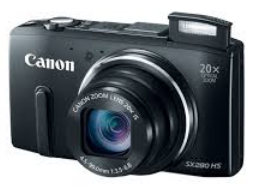
imageMy new camera came with the latest firmware and it supposedly fixed the issue of the camera flashing low battery when taking a movie, even though the battery is nearly full. What the customer sees is that their battery indicator shows 2 or 3 out of 3 bars, but when they switch to movie mode, the low battery indicator flashes immediately or after taking a minute of video. The camera may decide to shut down. Turning the camera back on restores the battery indicator to show the battery near full.

There are, in my opinion, several factors working together to create this problem in the perceived operation of the camera. The first is that the camera is underpowered. The standard 1000 mAh battery is only rated for 200-400 photos or 25 minutes of video. The camera gets noticeably hot when taking long video shots, indicating the power drain. This camera can be a battery hog especially if you use the Wi-Fi and the GPS features. The second factor is common to rechargeable batteries: new ones require a few charging cycles to reach maximum capacity. The third issue is that this camera reportedly requires a huge amount of power to zoom while taking video. Finally, it appears that the battery indicator operates differently depending on camera mode—what’s a nearly full battery for taking snapshots is a nearly empty battery when taking movies. The indicator may well be working correctly for each mode, representing what the camera can do in that mode, but it is confusing when switching back and forth. It appears to me that in movie mode, the battery indicator is overly pessimistic. I take photos, plus an occasional video, so I rely on the photo setting to gauge my battery life, and then am surprised when I find the battery depleted in movie mode.

My experimentation revealed that I got better battery life on the second charge cycle than on the first. I found that on the second charge I could take 39 minutes of video (in two long segments) zooming twice briefly, 6 snapshots, and still have battery left. Now during a good portion of that video shoot the low battery indicator was flashing, but the camera worked OK. The video was shot at the maximum resolution of 1920 x 1280  at 30 fps.

I found NB-6L replacement batteries by EZO at Newegg,  two for $14.99. They have the same 1000 mAh rating as the original equipment battery. At that price it’s practical to carry extra batteries when shooting all day. Note: I haven’t used these batteries yet and so this is not a recommendation of the brand.

The camera is new and I haven’t used it nearly enough to form an overall impression. The battery issue is confusing, but it’s not that big a deal. I decided to keep the camera and not return it.

Posted in Bad Commerce | Tagged , , | 5 Comments

Fixing Windows 8

I guess my only real complaint about Windows 8 is that it isn’t finished, not even close.

I currently have a desktop running Windows 7, a laptop running Windows 8.1, a tablet running Windows 8.1 and a tablet running Windows RT 8.1. I’ve used every version of Windows since 3.0.

The challenge is that the same user interface that works in a keyboard/mouse/monitor configuration won’t work on a tablet. There’s a ton of stuff in Windows 8.1 that you just cannot do without starting the Windows desktop, and all of that is what’s not finished.

Fragmented settings

For better or worse, Windows is incredibly complicated—just look at the Event Viewer, or the Group Policy Editor. Probably the single most vexing problem with Windows is that you can’t easily find out how to set things. With Windows 8.1 the problem is even worse because there are more places where things are hidden. Windows 8 isn’t done until there is a tablet-oriented user interface that gives access to ALL of the settings in Windows. The Windows desktop is unusable on a tablet, and a tablet user shouldn’t be forced to use it, ever.

Fix the search

The flexible search on the Start screen is cool, but it needs to default to searching within the application when it’s invoked from within an application, not search everywhere.

Put the Windows 7 start button back

Losing the Start button was the single-most dumb thing Microsoft did with Windows 8. If I understand the rationale, the Start screen replaced the start button—but it doesn’t. Desktop users don’t want the tablet interface—it’s hugely inefficient with a mouse. Also the lack of a start button makes it frustrating to move back and for between Windows 7 and Windows 8 machines when the button in the corner does different things: on one system you have to right-click and the other left click and even then it’s not the same.

A good start

I like the Metro interface a lot. It makes sense, it’s fast and responsive, it’s easy to organize, and it works great on a tablet. Now finish it, so I don’t have to keep switching to the desktop to do stuff.

Posted in Microsoft Surface, Technology | Tagged | Leave a comment

An open letter to the FCC

Tom Wheeler, Chairman
Federal Communications Commission
445 12th Street, SW
Washington, DC 20554

Dear Mr. Wheeler:

The Federal Trade Commission called “Rachel from Cardholder Services” public enemy number one, yet years later these illegal telemarketing scams continue unabated. I believe that the reason the national Do Not Call Registry is ineffective is that telecommunications carriers aren’t doing their part, and consumers do not have the tools they need to help the law to be enforced.

In order to report an illegal telemarketing call one needs the caller’s phone number. It’s possible just to report a name like “Rachel at Cardholder Services” but that recorded message is used by many phone scammers and without a number, no enforcement is possible. If you ask a telemarketer for details about who they are, they hang up. Getting the phone number is made more difficult by the carriers:

1. They charge additional fees for Caller ID.
2. Callers can block their phone numbers from Caller ID.
3. Callers can spoof their phone numbers.

The second tool a consumer might want is the ability to block a number that calls them often. This too is defeated by the carriers:

1. They charge extra for blocking
2. They support blocking only a limited list of numbers
3. Callers can block or spoof their phone numbers.

I support a regulation from the FCC that would require phone companies to implement technical means to empower telecommunications users to stop illegal telemarketing. One suggestion is to implement a way to flag an illegal telemarketing call by entering *SPAM on a phone after the call ends. Such a signal would block the number for the consumer and automatically report it to the FTC. If some number of unique complaints, say 10,000, were received, the carrier would be required to block the number system wide. Other ideas may be better, but my point is that the current system doesn’t work and that consumers today don’t have the tools to deal with the problem.

Posted in Bad Commerce | Tagged , , , , | Leave a comment

Getting Political: 2014

imageAnother election year has rolled around, and I’m getting a little political (I get more political in a presidential election year). The South Carolina Primary is tomorrow, June 10.

This year we have the unusual election of two US Senators in South Carolina: the usual 6-year election for Senator Graham’s seat, and an election to fill the unexpired 2 years of Jim DeMint’s term , who felt that it was more important to head a conservative think tank than to be a US Senator. Good riddance, Jim. DeMint’s seat had been temporarily filled by appointee Tim Scott.

Republican Lindsey Graham faces 6 Tea Party challengers, for whom he isn’t far-right enough. If Graham wins, things could get interesting according to insiders who say a certain prominent South Carolinian will run against him as an independent, a Ron Paul style candidate that could siphon off any Tea Party votes for Graham in the general election. Graham according to a recent poll has 49% support in the Republican Primary, with “Undecided” in second place at 35%. The SC Democratic Party has endorsed State Senator C. Bradley Hutto  in the race against Graham.

It has been a bizarre 4 years in South Carolina with the prospect of no Lieutenant Governor come July 1, and apparently no one wanting the job. Our first Lieutenant Governor of the term, Ken Ard, resigned amid ethics charges. The second, Glenn McConnell, resigns effective July 1 to become President of the College of Charleston, his alma mater. In South Carolina, the President pro tempore of the Senate becomes the Lieutenant Governor upon a vacancy (and leaves the Senate). However, current Senate President pro tempore John Courson says he will refuse to take the constitutional office and has resigned as President pro tem. If no Republican will take the job, we may end up with a Democratic Lieutenant Governor. 😯

About the only accomplishment of the SC Legislature this session was to pass a bill creating a uniform $25 fine for driving under the influence of texting, the next to last state in the nation to address the dangerous practice.

I learned about a very interesting web site maintained by South Carolina Republicans, called GOPwrite.com. They describe themselves as “reasonable grassroots Republicans.” I really like reasonable people.

Meanwhile local Democrats had a standing-room-only crowd at it’s monthly lunch meeting (about double the number expected).

I literally exercised my right to vote today by riding my bike the polling place. It’s not far, but oh the hills.

curbside_voting

Update:

Democrat John McGill is indeed South Carolina’s new Lieutenant Governor, and Thomas Ravenel has announced an independent challenge to Graham and Hutto in the Senate race.

Posted in Politics | Tagged , , , , , , , , , , , , | 2 Comments

Unsafe in Georgia

Georgia is the state next to where I live. I like to visit the Georgia Aquarium and the High Museum in Atlanta. Sometimes I shop at the outlets in Commerce, Georgia.

I don’t feel safe going to Georgia anymore now that the Governor signed a bill allowing guns in banks, churches, bars, schools (employees) and public buildings. I’m not trying to make a big fuss in the debate over the 2nd Amendment. It’s just a fact that people who are mentally unstable or abuse substances can get guns and that if enough guns are on the street, accidents will happen and people will get killed. I just don’t feel safe in Georgia, and I’m staying away.

Posted in Politics | Tagged | 2 Comments